

ChatSession (vanilla)#
Constructor#
import { ChatSession } from "@pinecall/web/chat";

const chat = new ChatSession({ agent: "florencia" });| Option | Type | Required | Description |
|---|---|---|---|
agent | string | ✅ | Agent slug (e.g. "florencia", "dev-berna-florencia") |
server | string | — | Voice server URL (default: https://voice.pinecall.io) |
tokenProvider | () => Promise<{ token, server }> | — | Mint the chat token on your backend instead of hitting /chat/token directly. Required to attach sealed metadata — see Passing metadata to the token. |
Methods#
| Method | Description |
|---|---|
connect() | Connect — fetches token, opens WebSocket |
disconnect() | Close the WebSocket connection |
destroy() | Disconnect + clear all subscribers. Do not reuse. |
send(text) | Send a text message to the agent |
setContext(key, value) | Inject / update / clear keyed context in the LLM prompt |
getState() | Read-only snapshot of current state |
subscribe(cb) | Subscribe to state changes (returns unsubscribe) |
Events (EventTarget)#
| Event | detail | When |
|---|---|---|
status | { status } | Connection status changed |
message | { message } | New or updated message |
error | { error } | Error occurred |
change | { state } | Any state mutation (most general) |
event | raw payload | Every raw server event |
State shape#
interface ChatSessionState {
  status: "idle" | "connecting" | "connected" | "error" | "destroyed";
  error: string | null;
  messages: ChatMessage[];
  typing: boolean;          // true while bot is streaming a response
  streamingText: string;    // partial text of the current bot response
  sessionId: string | null;
}

interface ChatMessage {
  id: number;
  role: "user" | "bot";
  text: string;
  messageId?: string;       // server-assigned ID (bot messages)
  isStreaming?: boolean;    // true while bot is still streaming
}
Reactive subscribe pattern#
Works with any reactive system — MobX, signals, Vue refs, Svelte stores:
const unsubscribe = chat.subscribe(() => {
  const state = chat.getState();
  console.log("Messages:", state.messages.length);
  console.log("Typing:", state.typing);
});

// clean up
unsubscribe();
Injecting dynamic context#
Same pattern as @pinecall/web's setContext() — inject live UI state into the LLM's system prompt:
chat.setContext("cart", JSON.stringify({
  items: ["Corte de cabello", "Tinte"],
  total: 85.00,
}));

// clear a context key
chat.setContext("cart", null);
The agent's system prompt picks this up automatically:
## UI Context
### cart
{"items":["Corte de cabello","Tinte"],"total":85.00}
setContext()is client-set and forgeable — fine for live UI hints (cart, current page). For anything you'll trust for authorization or tenant scoping (user id, role, company), seal it into the token instead — see below.
Passing metadata to the token (sealed session)#
setContext() runs in the browser, so a malicious client can change it. When you need
trusted per-user context — the logged-in user's id, role, tenant/company — you bake it
into the token itself on your server. The browser then connects with that opaque token
and can't forge or alter what's inside.
This is how one shared chat agent serves every user: each connection carries the
signed-in identity as call.metadata, and your tools scope by it in code.
How it flows#
- Browser → calls your backend via
tokenProvider(no API key in the browser). - Your server → mints the token with
createToken("chat", agentId, metadata)— themetadatacomes from the session, never the request body. - Agent → reads the sealed metadata as
call.metadataincall.started/call.preparing.
// ── 1. SERVER (behind your auth) — seal the session into the token ──
import { Pinecall } from "@pinecall/sdk";
const pc = new Pinecall(); // PINECALL_API_KEY from env

app.post("/api/chat-token", authMiddleware, async (req, res) => {
  const token = await pc.createToken("chat", "lumi", {   // ← 3rd arg = sealed metadata
    companyId: req.auth.companyId,
    userId:    req.auth.userId,
    role:      req.auth.role,
    userName:  req.auth.name,
    threadId:  req.body.threadId,   // optional: restore a conversation
  });
  res.json(token); // { token, server, expiresIn }
});
With an
Agentinstance the call isagent.createToken("chat", metadata)(theagentIdis implicit — note metadata is the 2nd arg there, vs the 3rd onpc.createToken).
// ── 2. BROWSER — connect via tokenProvider; the metadata is already inside the token ──
import { ChatSession } from "@pinecall/web/chat";

const chat = new ChatSession({
  agent: "lumi",
  tokenProvider: async () => {
    const res = await fetch("/api/chat-token", {
      method: "POST",
      headers: { "Content-Type": "application/json" },
      credentials: "include",                 // send your auth cookie/session
      body: JSON.stringify({ threadId }),
    });
    return res.json();                        // { token, server }
  },
});
await chat.connect();
// ── 3. AGENT — read the sealed metadata; isolation lives in CODE, never the prompt ──
const agent = pc.agent("lumi", {
prompt: `${SYSTEM}\n\n{{SESSION}}`,
llm: "anthropic/claude-haiku-4-5",
tools: [listAppointments],
});
agent.on("call.started", (call) => {
const m = call.metadata; // { companyId, userId, role, ... } — trusted
call.setPromptVars({ SESSION: `<user>${esc(m.userName)} (${esc(m.role)})</user>` });
});
const listAppointments = tool({
name: "list_appointments",
schema: z.object({ date: z.string().optional() }),
execute: async ({ date }, call) => {
const { companyId } = call.metadata; // sealed → safe to authorize on
return db.scope(companyId).appointments.forDate(date);
},
});
setContext()vs sealed metadata —setContext()is browser-set (forgeable) live UI state; token metadata is server-signed (trusted) session identity. UsesetContext()for UI hints, the token for anything you authorize on. Full pattern: Multi-Tenant → sealed token metadata.
usePinecallChat (React)#
React-only hook exported from @pinecall/web/chat/react. Wraps ChatSession with useSyncExternalStore for efficient rendering. Session is created once on mount and destroyed on unmount.
Quick usage#
import { usePinecallChat } from "@pinecall/web/chat/react";

function Chat() {
  const { messages, send, connected, typing, streamingText } = usePinecallChat({
    agent: "florencia",
  });

  if (!connected) return <p>Connecting...</p>;

  return (
    <div>
      {messages.map((m) => (
        <p key={m.id}>
          <strong>{m.role}:</strong> {m.text}
          {m.isStreaming && "▊"}
        </p>
      ))}
      {typing && <p>Bot is typing: {streamingText}▊</p>}
      <input
        placeholder="Type a message..."
        onKeyDown={(e) => {
          if (e.key === "Enter") {
            send(e.currentTarget.value);
            e.currentTarget.value = "";
          }
        }}
      />
    </div>
  );
}
Hook options#
| Option | Type | Default | Description |
|---|---|---|---|
agent | string | required | Agent ID |
server | string | "https://voice.pinecall.io" | Voice server URL |
tokenProvider | () => Promise<{ token, server }> | — | Mint the token on your backend (required for sealed metadata) |
autoConnect | boolean | true | Connect on mount automatically |
Hook return#
| Field | Type | Description |
|---|---|---|
messages | ChatMessage[] | All messages in the conversation |
send | (text: string) => void | Send a text message |
connected | boolean | true when connected to the server |
typing | boolean | true while the bot is streaming |
streamingText | string | Partial text of the current bot response |
error | string | null | Current error, if any |
setContext | (key, value) => void | Inject dynamic context into the LLM prompt |
connect | () => void | Manually connect (if autoConnect: false) |
disconnect | () => void | Manually disconnect |
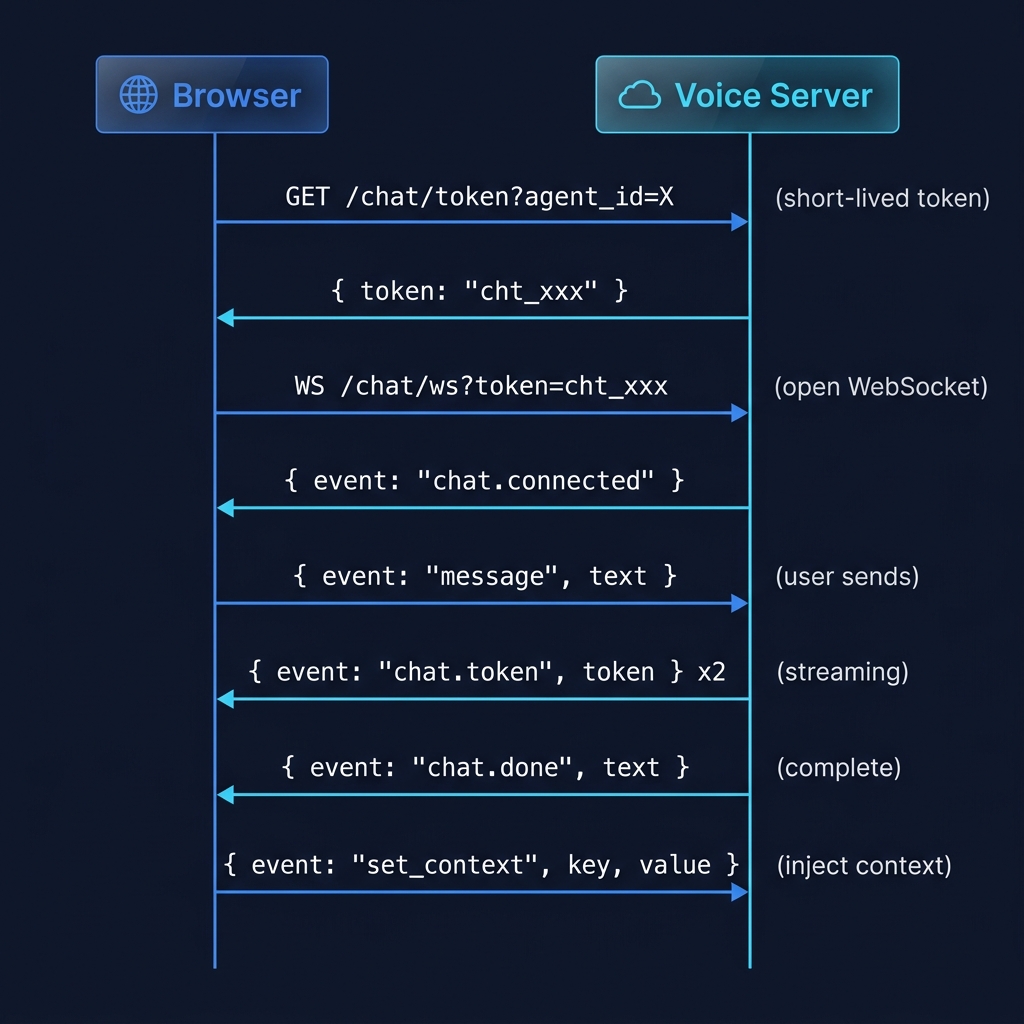
Protocol#
What happens under the hood:
Related packages#
| Package | Description |
|---|---|
@pinecall/sdk | Server-side SDK — agent, call, tools, channels |
@pinecall/web/core | WebRTC voice session (framework-agnostic) |
@pinecall/web | React voice widget with animated orb |