

Defining tools#
Use the tool() helper with a Zod schema. Tools are auto-executed by the SDK when the LLM calls them — no manual event handler needed.
import { Pinecall, tool } from "@pinecall/sdk";
import { z } from "zod";

const lookupOrder = tool({
  name: "lookupOrder",
  description: "Look up an order by its ID.",
  schema: z.object({
    orderId: z.string().describe("The order ID, like ORD-12345"),
  }),
  execute: async ({ orderId }) => {
    return await db.orders.findOne(orderId);
  },
});

const scheduleCallback = tool({
  name: "scheduleCallback",
  description: "Schedule a callback for a specific date and time.",
  schema: z.object({
    datetime: z.string().describe("ISO 8601 datetime"),
    reason: z.string(),
  }),
  execute: async ({ datetime, reason }, call) => {
    return await scheduler.book({
      phone: call.from,
      datetime,
      reason,
    });
  },
});

const agent = pc.agent("support", {
  prompt: "You are a helpful support agent. Use tools to look up information.",
  llm: "openai/gpt-5.4-nano",
  voice: "elevenlabs/sarah",
  stt: "deepgram/flux",
  language: "en",
  tools: [lookupOrder, scheduleCallback],
});

agent.on("call.started", (call) => call.say("Hi, how can I help?"));
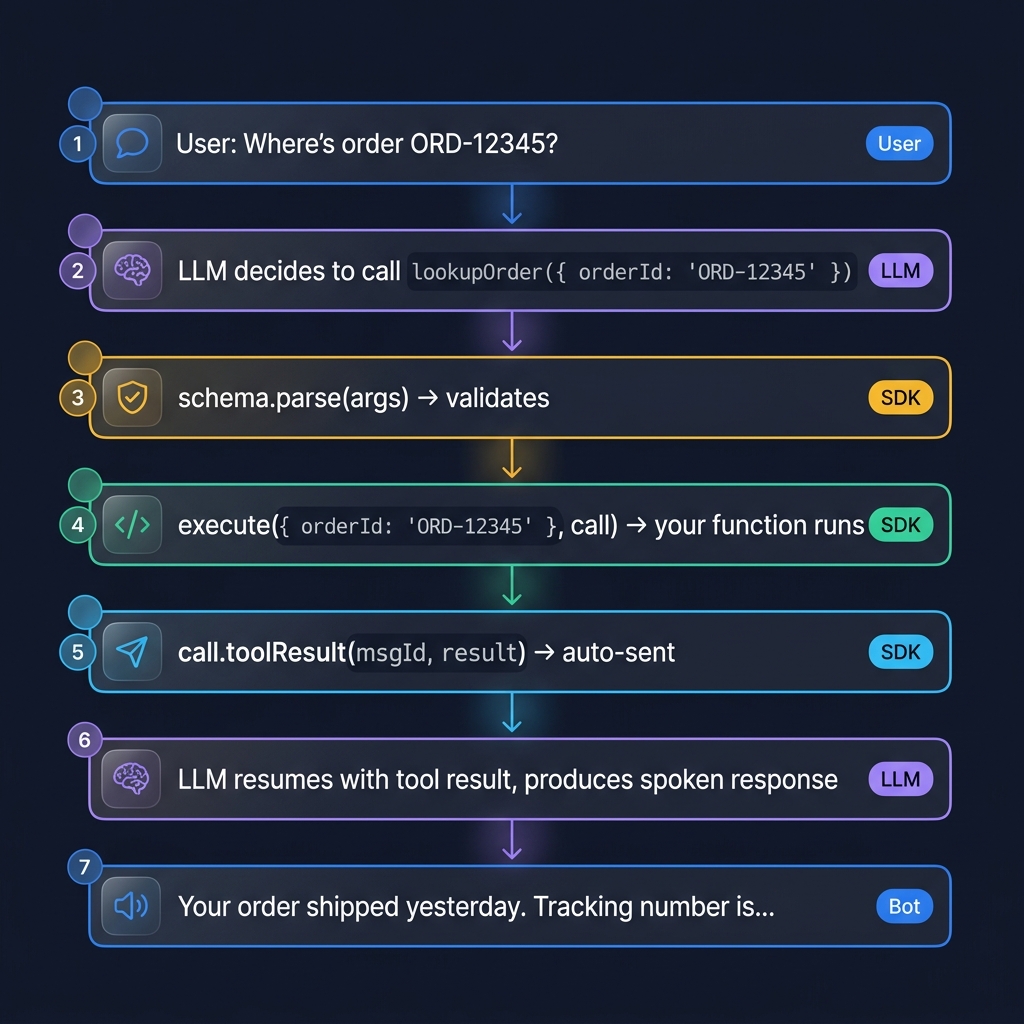
That's it. When the LLM decides to call lookupOrder, the SDK:
- Parses the arguments through
z.object({ orderId: z.string() }) - Calls your
executefunction with the validated args + theCallobject - Sends the result back to the LLM via
call.toolResult()
Tool call lifecycle#
Ephemeral tools (don't persist the result)#
By default every tool result is saved to the conversation history — it stays in the LLM context for the rest of the call and is written to the persisted transcript. That's almost always what you want.
Sometimes it isn't. A tool might return a sensitive lookup (a full customer
record, a one-time code) or a large/noisy payload (a 5 KB JSON blob) that you
need for the current reply but don't want lingering in context or saved to the
database. Mark such a tool ephemeral: true:
const lookupSSN = tool({
  name: "lookupSSN",
  description: "Look up the caller's SSN to verify identity.",
  schema: z.object({ customerId: z.string() }),
  ephemeral: true, // result is used for this reply, then dropped from history
  execute: async ({ customerId }) => ({ ssn: await db.getSSN(customerId) }),
});
How it works: the result is still sent to the model so it can generate the
current reply (the API requires every tool call to be followed by its result).
But once that reply is produced, the server prunes the ephemeral result —
and the originating tool_calls entry if all of its calls were ephemeral — from
the history. It never reaches the next turn's context and is never written to
the saved transcript. The behavior is identical across voice, chat, and
WhatsApp.
ephemeral defaults to false, so existing tools are unchanged.
UI-only tools — no follow-up reply (noFollowup)#
By default, after a tool returns its result the server feeds that result back to the LLM, which generates another assistant turn (so the agent can talk about what the tool did). That's what you want for most tools — "I found your order, it ships Tuesday."
But some tools are UI-only: their result just drives the interface and there
is nothing for the agent to say about it. A classic example is a tool that hands
the browser a set of suggested-question chips, or fires a toast, or mutates some
client state. For those, the extra assistant turn is noise — often a duplicate of
what was just said. Mark such a tool noFollowup: true:
const suggestQuestions = tool({
  name: "suggestQuestions",
  description: "Offer 2–4 follow-up question chips the user might tap next.",
  schema: z.object({ questions: z.array(z.string()) }),
  noFollowup: true, // result goes to the UI; do NOT generate another reply
  execute: async ({ questions }) => ({ questions }),
});
How it works: the tool executes and its result is still delivered to the client
via the llm.tool_result event (so your UI can render it). But the server then
ends the turn instead of prompting the model again — the reply the model
already produced before calling the tool stands as the final answer. No
duplicate turn, no extra latency, no extra tokens.
noFollowup only takes effect when every tool called in that round is
noFollowup. If the model calls a normal tool and a noFollowup tool together,
the turn still continues — the normal tool's result needs a reply. Combine with
ephemeral: true if you also don't want the UI-only result kept in history.
noFollowup defaults to false, so existing tools are unchanged.
Requires a tool-capable model (e.g.
openai/gpt-4.1-mini,anthropic/claude-*). Chat-only OpenAI snapshots such asgpt-5.4-nanodo not emittool_calls.
The call parameter#
Every execute function receives the Call object as its second argument. Use it to interact with the call mid-tool-execution:
const transferToHuman = tool({
  name: "transferToHuman",
  description: "Escalate to a human agent.",
  schema: z.object({
    department: z.enum(["sales", "support", "billing"]),
  }),
  execute: async ({ department }, call) => {
    const numbers = {
      sales: "+15551110000",
      support: "+15551110001",
      billing: "+15551110002",
    };
    call.say("Of course, let me connect you to a specialist.");
    call.forward(numbers[department]);
    return { transferred: true };
  },
});
Why local functions beat webhooks#
Other platforms make tools webhook URLs. You define a tool, expose a public endpoint, the platform POSTs to it. The downsides pile up fast:
- You expose a public endpoint — attack surface, rate limiting, auth headaches
- You can't reach internal services — your DB, your Redis, your hardware
- Latency — every tool call is a network roundtrip across the public internet
- Debuggability — tool call goes out, response comes back, what happened in between?
Pinecall tools run in your process. That means:
await db.query(...)works directlyawait redis.get(...)works directlyawait hardware.openDoor()works directly (if your process can reach it)- Stack traces, breakpoints, and logs work normally
- No public surface to attack
- Sub-millisecond "call" overhead — it's a function call, not an HTTP request
Common patterns#
Database lookups#
const findCustomer = tool({
  name: "findCustomer",
  description: "Find a customer by phone number or email.",
  schema: z.object({
    query: z.string().describe("Phone or email"),
  }),
  execute: async ({ query }) => {
    const customer = await db.customers.find({
      or: [{ phone: query }, { email: query }],
    });
    return customer ?? { error: "not_found" };
  },
});
Transfer to human#
const transferToHuman = tool({
  name: "transferToHuman",
  description: "Escalate to a human agent when the customer is angry or has a complex issue.",
  schema: z.object({
    department: z.enum(["sales", "support", "billing"]),
  }),
  execute: async ({ department }, call) => {
    const numbers = { sales: "+15551110000", support: "+15551110001", billing: "+15551110002" };
    call.say("Of course, let me connect you to a specialist.");
    call.forward(numbers[department]);
    return { transferred: true };
  },
});
Booking / scheduling#
const bookAppointment = tool({
  name: "bookAppointment",
  description: "Book an appointment in the doctor's calendar.",
  schema: z.object({
    datetime: z.string().describe("ISO 8601 datetime"),
    durationMinutes: z.number(),
    patientName: z.string(),
  }),
  execute: async ({ datetime, durationMinutes, patientName }) => {
    const slot = await calendar.book({
      start: new Date(datetime),
      duration: durationMinutes,
      patient: patientName,
    });
    return slot.success
      ? { booked: true, confirmationId: slot.id }
      : { booked: false, error: slot.conflictReason };
  },
});
Tell the dashboard#
A tool's side effect is usually something the people watching the call want to
see now — not after the transcript mentions it. call.log(name, value)
appends a durable custom entry to the call log,
visible to every observer (useCall, GET /v1/calls/{id}/events, SSE) and
replayed on resume. Pass an id to make later entries replace the same row
instead of adding a new one:
const bookAppointment = tool({
  name: "bookAppointment",
  description: "Book an appointment in the doctor's calendar.",
  schema: z.object({
    datetime: z.string().describe("ISO 8601 datetime"),
    patientName: z.string(),
  }),
  execute: async ({ datetime, patientName }, call) => {
    call.log("booking", { status: "checking", datetime }, { id: "booking" });
    const slot = await calendar.book({ start: new Date(datetime), patient: patientName });
    call.log(
      "booking",
      slot.success
        ? { status: "confirmed", datetime, confirmationId: slot.id }
        : { status: "failed", reason: slot.conflictReason },
      { id: "booking" },                 // same (name, id) → the row is updated
    );
    return slot.success ? { booked: true } : { booked: false, error: slot.conflictReason };
  },
});
The dashboard sees one booking row go checking → confirmed. Names are
lowercase and dot-namespaced (^[a-z0-9][a-z0-9._-]{0,63}$), values are any
JSON up to 16 KiB, and a refusal arrives as the call's log.rejected event —
the full rules are in Custom entries.
End the call#
const endCall = tool({
  name: "endCall",
  description: "End the call when the customer says goodbye.",
  schema: z.object({}),
  execute: async (_, call) => {
    call.say("Have a great day!");
    call.once("bot.finished", () => call.hangup());
    return { ended: true };
  },
});
Returning errors#
If a tool call fails, the SDK catches the error and returns { error: err.message } to the LLM automatically. The LLM can then recover (apologize, retry, ask clarifying questions).
You can also return errors explicitly:
const lookupOrder = tool({
  name: "lookupOrder",
  description: "Look up an order by ID.",
  schema: z.object({ orderId: z.string() }),
  execute: async ({ orderId }) => {
    const order = await db.orders.findOne(orderId);
    if (!order) return { error: "Order not found" };
    return order;
  },
});
Listening to tool calls (optional)#
The llm.toolCall event still fires for every tool call — useful for logging, metrics, or UI:
agent.on("llm.toolCall", (data, call) => {
  console.log(`Tools called: ${data.toolCalls.map(t => t.name).join(", ")}`);
});
Tools work across all channels#
The same tools work for phone, WebRTC, chat, and WhatsApp. The Call object is your interface regardless of transport.
What's next#
- Hot-reload — change the prompt or tools mid-call
- Events reference — all events including
llm.toolCall CallAPI reference —forward,hangup, etc.