

The fundamental split#
Before topology, understand the two communication patterns:
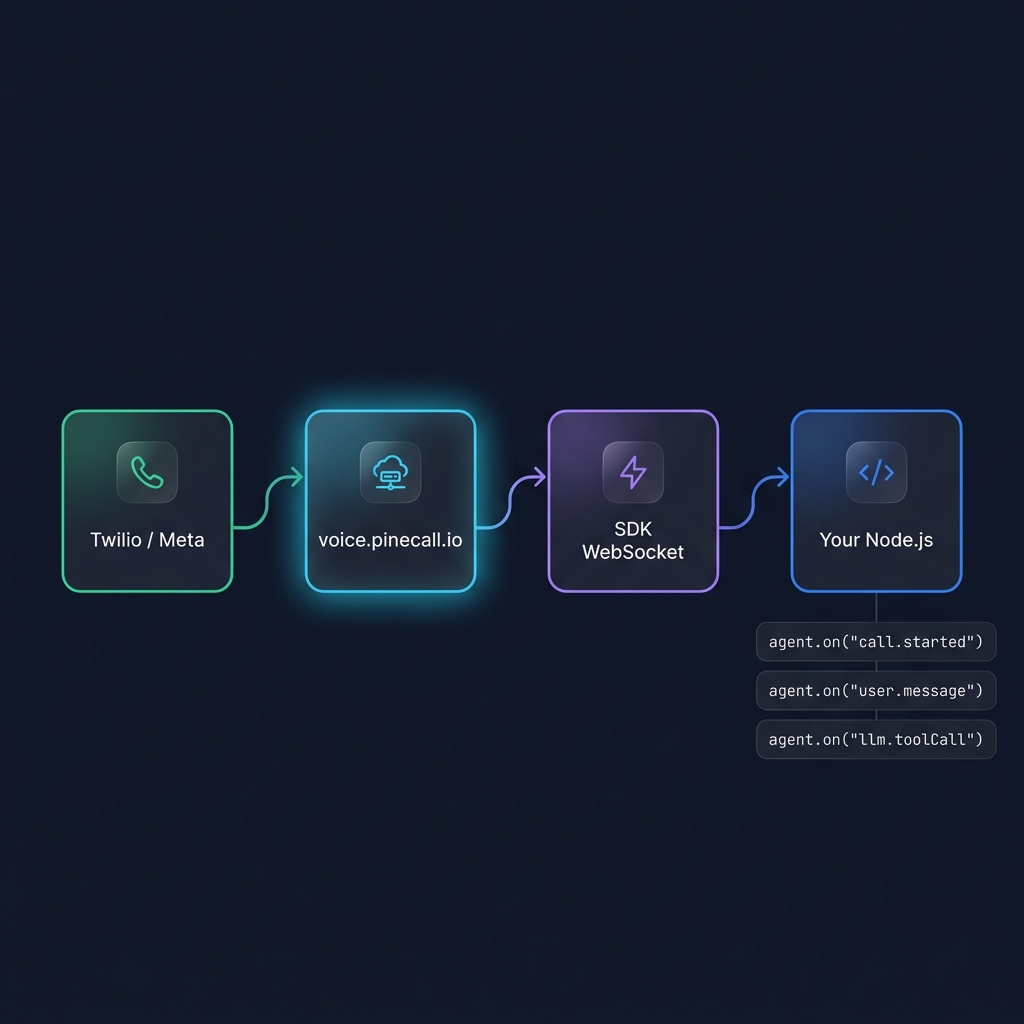
1. Backend channels — phone, SIP, WhatsApp. These talk to your Node.js process via the SDK's WebSocket. Your code receives events through an in-process EventEmitter.
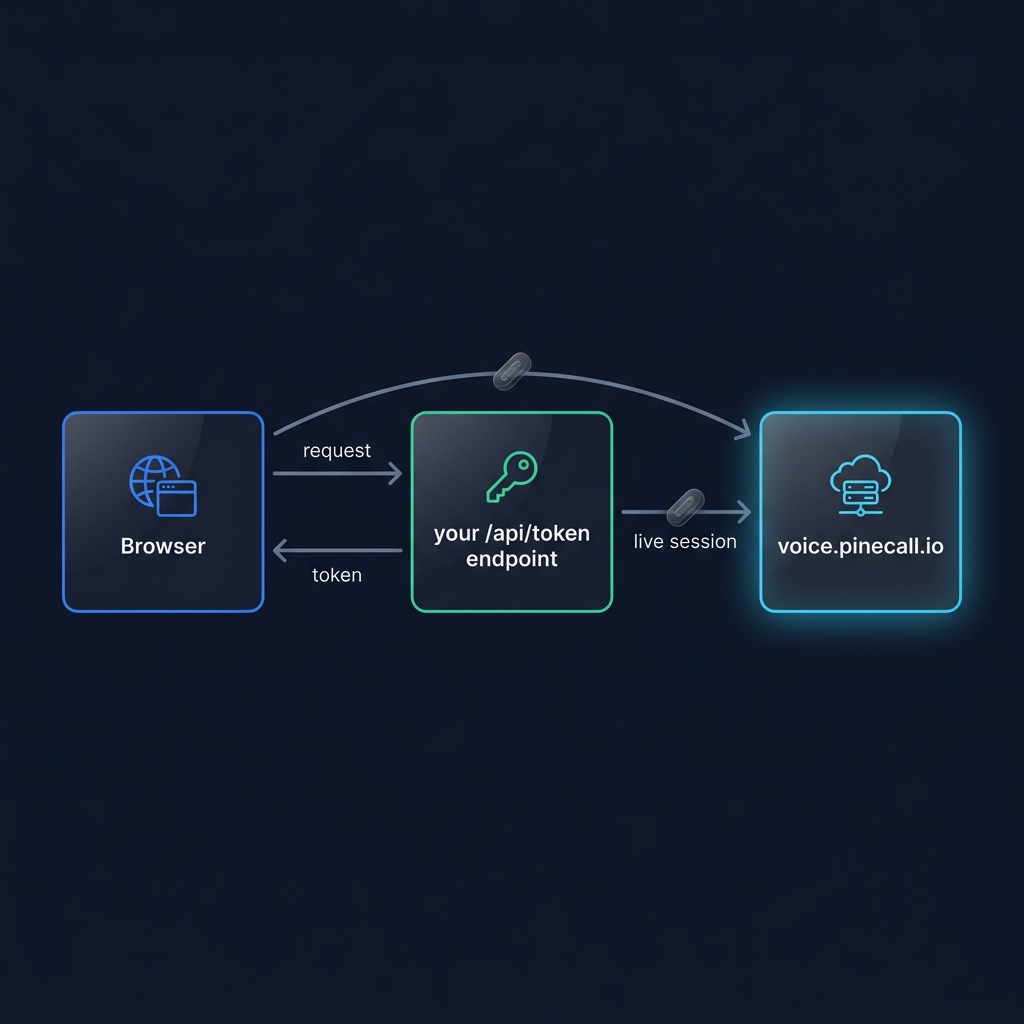
2. Browser channels — WebRTC and chat. The browser connects directly to voice.pinecall.io. Your backend's only job is minting short-lived tokens.
This split used to decide whether you could build live dashboards — the old in-process streaming APIs required the agent to share a process with your web server. The call log removed that constraint, and then removed those APIs: any process — or the browser itself, with a stream token — reads GET /v1/calls/{id}/events over SSE and sees every call with replay and cursor resume. Observability is no longer a topology decision. See Observe calls.
Topology 1: Embedded#
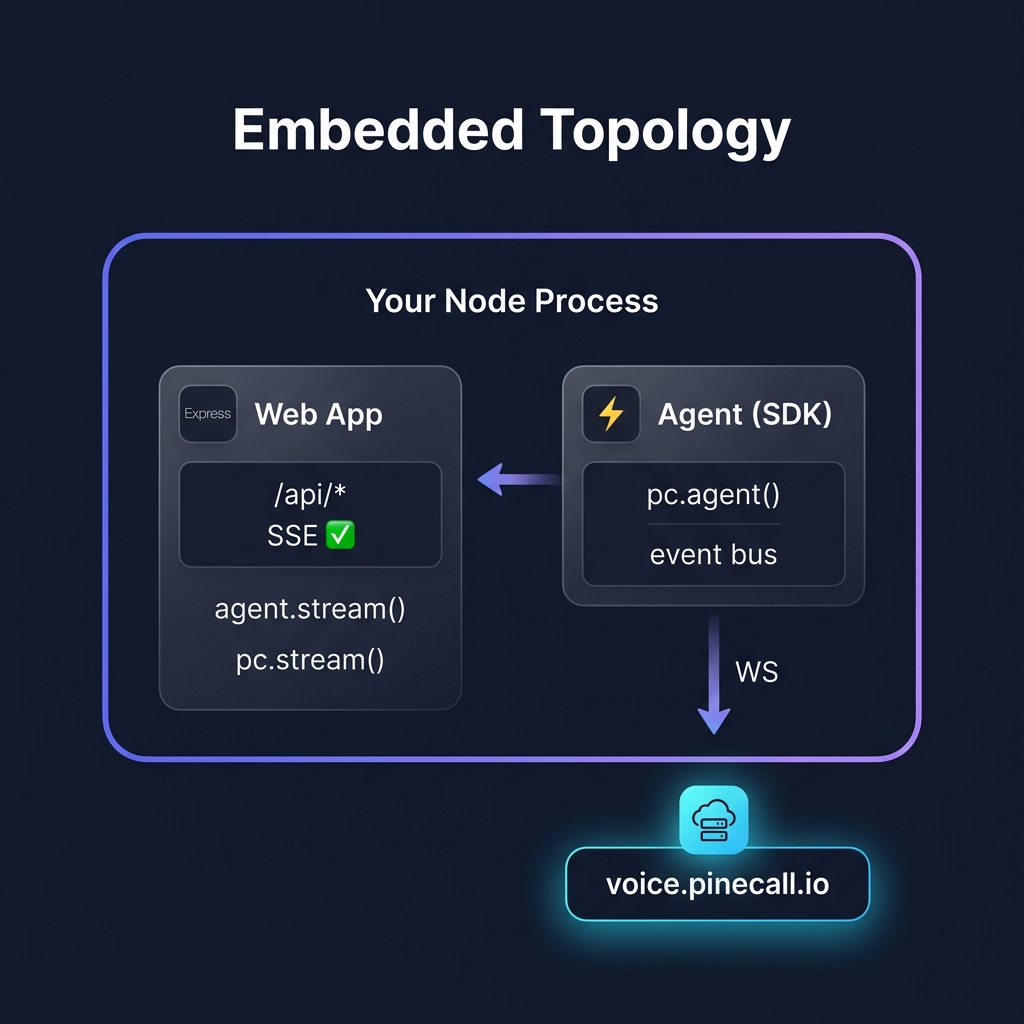
Agent runs inside your existing web app (Express, Next.js, Hono, Remix). The web server and the agent share a Node.js process.
Pros:
- One deployment unit — easy ops
- The agent's
on()handlers and your web routes share memory - Token endpoint is one route away from the agent
Cons:
- The agent process restarts every time you deploy the web app
- Web traffic and voice traffic share resources
When to use: small apps, single-team projects, anything that is not yet big enough to pay for two deploys. Reference app: dental-desk — one process, and a live console reading the call log (Build a live call app).
Topology 2: Standalone#
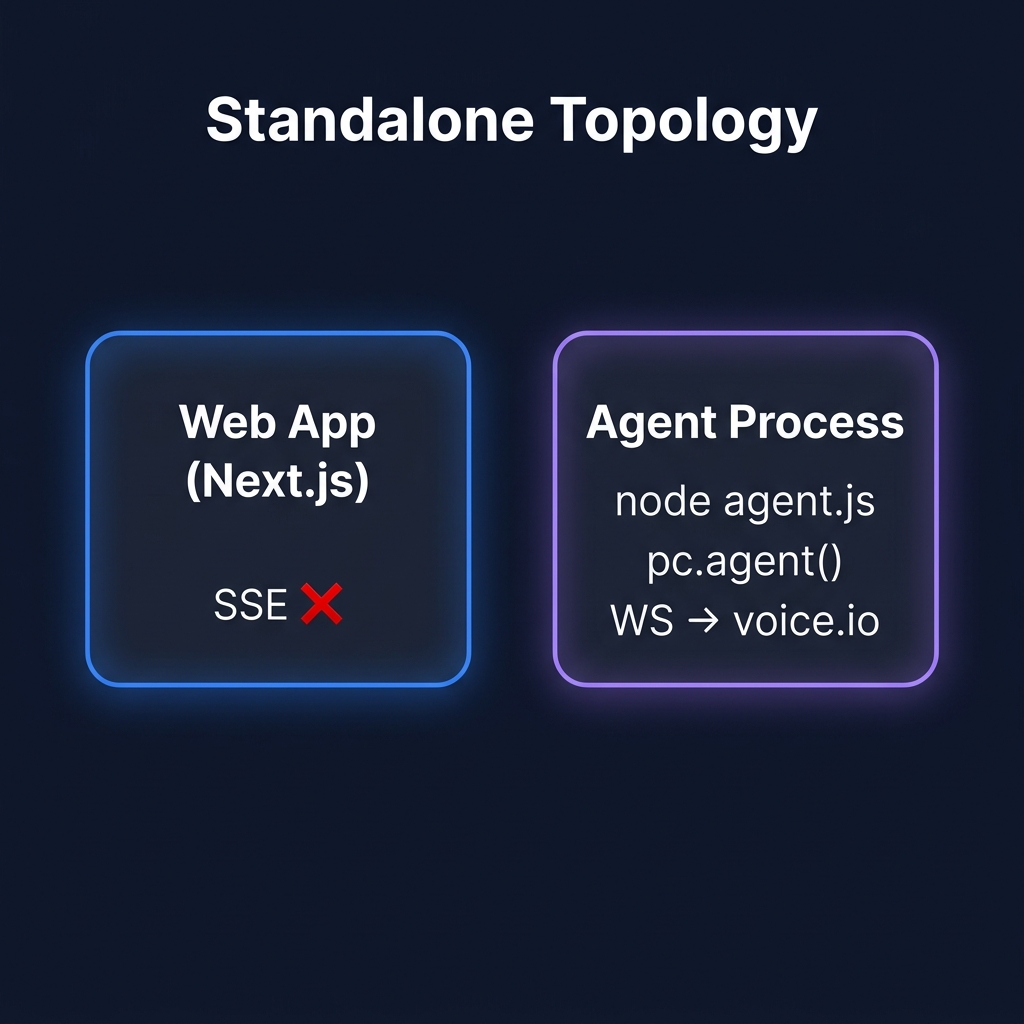
Agent runs as a separate process from your web app. The web app handles HTTP, the agent process handles voice.
Pros:
- Independent deploys — restart the agent without touching the web app
- Independent scaling — give the agent its own resources
- Crash isolation — a web bug doesn't kill calls in flight
Cons:
- The web app can't tap the agent process's event emitter directly. Live dashboards are unaffected — they read the call log with a stream token, exactly as they do when embedded — but anything you built on a shared in-process bus needs the database or the log instead.
- Two deployments to manage
When to use: higher-traffic apps, when ops cares about independent scaling, when you want to avoid the "web deploy kills in-flight calls" problem. Getting there from embedded is a second entry file and a real database — see Project structure; the live panel does not change at all.
Topology 3: Headless#
No web server at all. Just the agent. Use this when you only need phone/SIP/WhatsApp — no browser channels, no dashboards, no tokens to mint.
// agent/index.js — a complete production agent, no web server needed
import { Pinecall } from "@pinecall/sdk";

const pc = new Pinecall();

export const agent = pc.agent("support", {
  prompt: "You are a support agent for an online store...",
  llm: "openai/gpt-5.4-nano",
  voice: "elevenlabs/sarah",
  stt: "deepgram/flux",
  language: "en",
  phoneNumber: "+13186330963",
  greeting: "Hi! How can I help?",
  tools: [lookupOrder, processReturn],
});
Run it with pinecall run agent/index.js for a polished boot banner and live transcript.
Pros:
- Lowest possible complexity
- No HTTP surface to attack or maintain
- Easy to ship as a container, a systemd unit, or a serverless function
Cons:
- No browser channels (no WebRTC, no chat) unless someone else mints tokens
- No token endpoint means no browser dashboards either — though the calls themselves are still observable from any process holding a stream token,
pc.observe({ agent })included
When to use: IoT devices, intercoms, single-purpose phone bots, WhatsApp-only bots, scheduled outbound campaigns.
Comparison#
| Feature | Embedded | Standalone | Headless |
|---|---|---|---|
| Call log dashboards | ✅ | ✅ | ✅ |
pc.observe() from Node | ✅ | ✅ | ✅ |
| In-process event bus shared with your web routes | ✅ | ❌ | ❌ |
| WebRTC / Chat | ✅ | ✅ (token from web app) | ❌ (or you build it) |
| Phone / SIP | ✅ | ✅ | ✅ |
| ✅ | ✅ | ✅ | |
| Outbound calls | ✅ | ✅ | ✅ |
| Operational complexity | Medium | Medium | Lowest |
| Independent scaling | ❌ | ✅ | ✅ |
| Crash isolation | ❌ | ✅ | n/a |
Which one should you pick?#
- Just starting out — embedded. Get something running, split later if you need to.
- You need browser channels and a dashboard — either; the dashboard reads the call log in both.
- You're scaling and ops cares — standalone.
- You're shipping a fixed-purpose device or WhatsApp-only bot — headless.
Migration between topologies is cheap. The agent code is the same in all three. You're just choosing where to run it.
What's next#
- Observe calls — topology-independent observability
- The Call Log — the wire underneath it
- Multi-tenant dashboards — embed multiple agents, scope events per user
- Dev mode — run prod and dev agents on the same phone number