

Token security model#
Browser connections (WebRTC and chat) use short-lived tokens generated by the voice server. The recommended model:
Your backend generates tokens using your API key, and distributes them to browsers through your own auth layer.
This is the same model used by LiveKit, Twilio, Daily.co, and every major real-time platform.
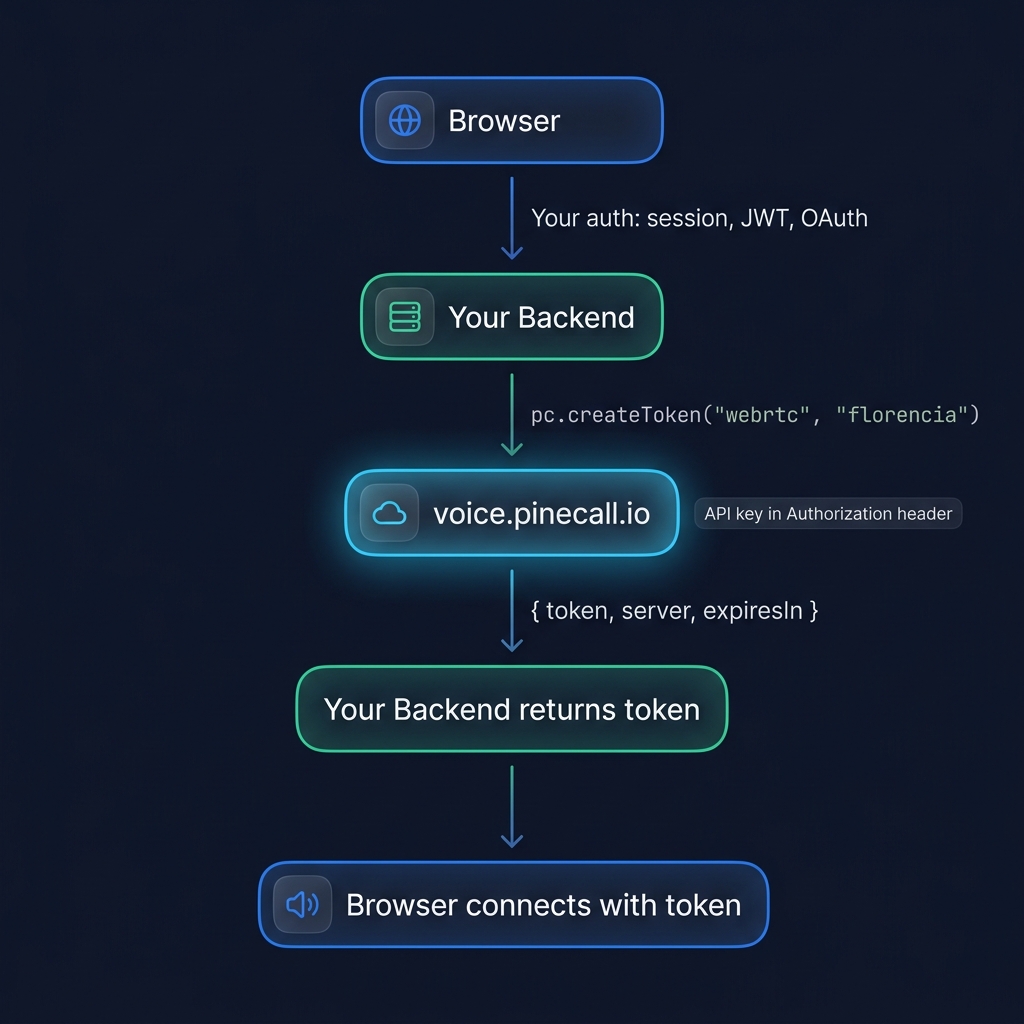
Backend (Express, Next.js, Hono, etc.)#
import { Pinecall } from "@pinecall/sdk";

const pc = new Pinecall();

const agent = pc.agent("florencia", { /* config */ });

// Token endpoint — protected by YOUR auth
app.get("/api/token", authMiddleware, async (req, res) => {
  const channel = req.query.channel as "webrtc" | "chat";
  const token = await agent.createToken(channel);
  res.json(token);
});
If the agent is in a separate process (you only have pc in the web server):
app.get("/api/token", authMiddleware, async (req, res) => {
  const token = await pc.createToken("webrtc", "florencia");
  res.json(token);
});
Frontend (VoiceWidget)#
<VoiceWidget
  agent="florencia"
  tokenProvider={async () => {
    const res = await fetch("/api/token?channel=webrtc", {
      credentials: "include", // send your session cookie
    });
    return res.json();
  }}
/>
Why tokens are safe#
Tokens have three security properties that make them safe to pass to browsers:
| Property | Value | Effect |
|---|---|---|
| Single-use | Consumed on first connection | Can't be reused by an attacker |
| Short-lived | 60 second TTL | Expires before anyone can steal it |
| Scoped | Locked to agent + org | Can't be used for a different agent |
The token is not the security boundary — your backend is. The token is a short-lived capability that proves "someone authorized gave me permission to connect." The security question is: who can call your /api/token endpoint?
- Requires login → only authenticated users get tokens
- Rate limited → can't bulk-generate tokens
- Permission-checked → only authorized users connect
Think of it like a movie ticket: the theater (your backend) verifies your identity and gives you a ticket. The ticket works once, for one screen, for a limited time. Even if someone steals the ticket, they get one session — and they'd need to break TLS to intercept it.
allowedOrigins (convenience mode)#
For simple deployments without a backend (demos, prototypes, CodePen), you can opt-in to public token access by configuring allowedOrigins:
const agent = pc.agent("demo-bot", {
  allowedOrigins: [
    "https://demo.mysite.com",      // exact match
    "https://*.mysite.com",          // subdomain wildcard
    "http://localhost:*",            // any port (dev)
  ],
});
When allowedOrigins is set, the token endpoint accepts browser requests from matching origins without an API key. The Origin header is browser-enforced (real browsers can't spoof it).
<VoiceWidget agent="demo-bot" />Warning:
allowedOriginsprotects against casual embedding but not against a determined attacker — Origin headers can be spoofed from scripts/curl. For production with real users, always usetokenProviderwith your backend auth.
Mode comparison#
| Mode | Security level | Use case |
|---|---|---|
tokenProvider (backend) | ✅ Full auth control | Production apps |
allowedOrigins (public) | ⚠️ Origin-based only | Demos, prototypes |
| Neither (default) | ❌ Rejected | — |
What a browser may change about a session#
A page can shape how a session sounds and hears — this is how a language picker or a voice selector works — but not what the agent is.
From the browser (config on VoiceSession / VoiceWidget, or configure() mid-call) | |
|---|---|
| Accepted | voice · language · stt · tts · greeting · flash |
| Refused | prompt · llm · tools · knowledge_base · skills · raw_prompt |
The refused keys are enforced server-side, on both the pre-call offer and mid-call updates, and dropped keys are logged. This matters most for a public agent (allowedOrigins), where anyone who can open the page can send whatever they like: without the allowlist, a visitor could replace the system prompt from the console or select a model billed to your organization.
The same split applies to context: metadata sent from the browser is forgeable and is overwritten by any key of the same name sealed into the token. Authorize on the sealed values only — see sealed token metadata.
API key handling#
Your PINECALL_API_KEY is the master credential. Treat it like a database password:
- Never ship it in browser code, mobile apps, or public repos
- Always load it from environment variables on the server
- Rotate it if you suspect exposure (via the dashboard)
- Scope it per-environment (separate keys for dev, staging, prod)
The SDK never exposes the API key over the wire in browser-bound responses — createToken returns only the short-lived token.
Webhook signature verification (WhatsApp)#
For WhatsApp, set appSecret so the server verifies the HMAC signature on every incoming webhook:
agent.addWhatsapp({
  phoneNumberId: "...",
  accessToken: "...",
  verifyToken: "...",
  appSecret: process.env.WA_APP_SECRET, // HMAC verification
});
Without appSecret, the webhook accepts any request — anyone who finds your endpoint URL can inject fake messages. Always set it in production.
What's next#
- WebRTC in the browser — full setup
- Multi-tenant — per-tenant token isolation
- WhatsApp — webhook verification