

The four nouns#
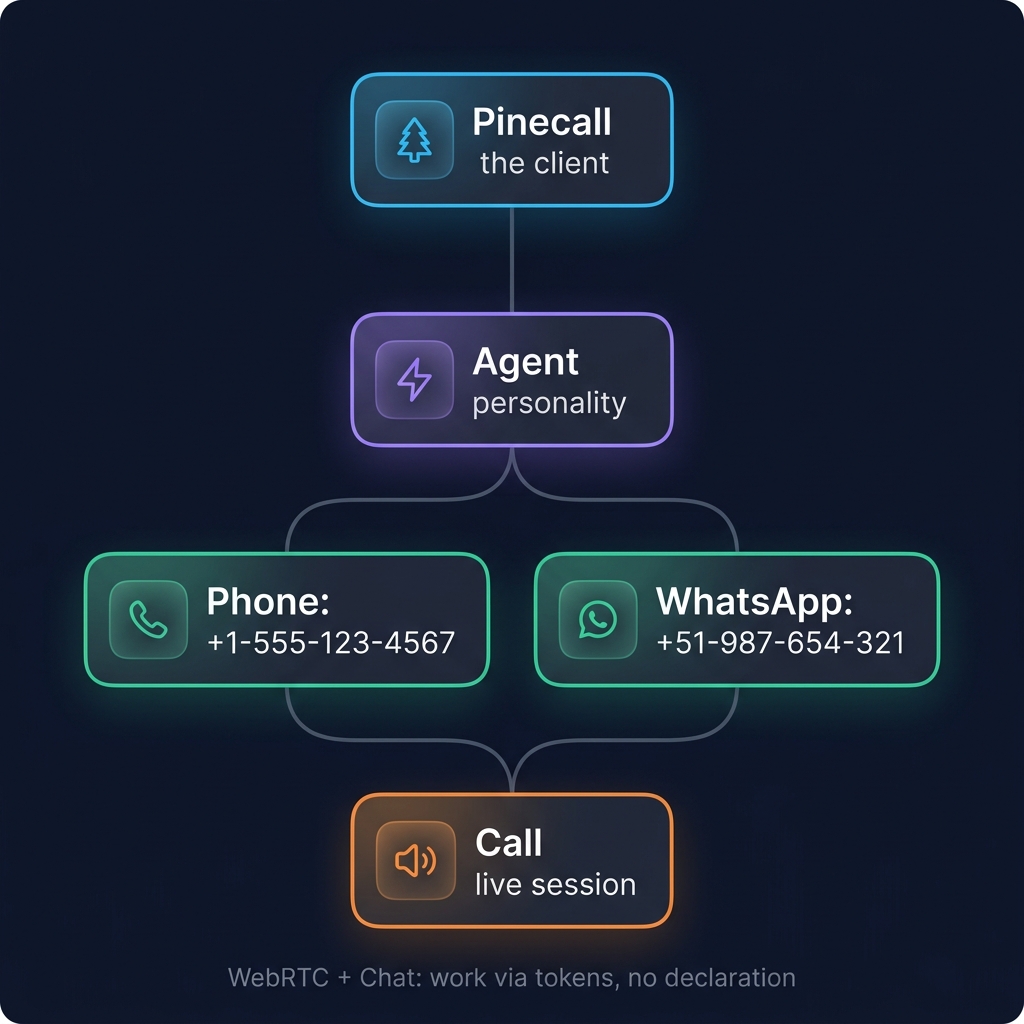
Pinecall — the client#
One per process. Owns the WebSocket connection to voice.pinecall.io, handles auth and reconnection, and multiplexes events across multiple agents. Auto-connects on construction.
const pc = new Pinecall(); // reads PINECALL_API_KEY from env, connects automaticallyAgent — a personality#
A configured assistant. Has a name (the agent ID), a voice, an STT provider, an LLM config, and a list of tools. Listens for events; owns channels.
const agent = pc.agent("support", {
  voice: "elevenlabs/sarah",
  language: "en",
  llm: "openai/gpt-5.4-nano",
  stt: "deepgram/flux",
  prompt: "...",
});
You can have many agents on the same Pinecall instance — support, sales, intake — each with their own personality and channels.
Channel — a way to reach the agent#
A surface through which calls arrive. Some channels need explicit registration; others work automatically:
// Phone number — declared in config
const agent = pc.agent("support", {
  phoneNumber: "+13186330963",
  whatsapp: [{ phoneNumberId: "123", accessToken: "..." }],
});

// Or imperatively:
agent.addPhoneNumber("+13186330963");
agent.addWhatsapp({ phoneNumberId: "123", accessToken: "..." });

// WebRTC + Chat: work via tokens, no registration needed
const token = await agent.createToken("webrtc");
Channel types:
| Type | Registration | How users connect |
|---|---|---|
phone | phoneNumber: "+1..." | Call the number |
whatsapp | whatsapp: [{...}] | Send a WhatsApp message |
webrtc | None (automatic) | Browser widget + token |
chat | None (automatic) | WebSocket + token |
Call — a live session#
Created automatically when someone connects on a channel. You receive a Call object in the call.started event. Use it to:
- Speak (
call.say,call.reply,call.replyStream) - Control the call (
call.hangup,call.forward,call.hold) - Update mid-call (
call.update,call.setPrompt,call.addContext) - Read state (
call.transcript,call.from,call.duration)
Creating an agent#
With phoneNumber (declarative)#
Pass a phone number directly in the config:
const mara = pc.agent("mara", {
  voice: "elevenlabs/sarah",
  language: "es",
  llm: "openai/gpt-5.4-nano",
  stt: "deepgram/flux",
  prompt: "You are Mara. Be concise.",
  phoneNumber: "+13186330963",
});
WebRTC and Chat work automatically — no declaration needed. Just create tokens.
With agent.addPhoneNumber() (imperative)#
Use agent.addPhoneNumber() when you need per-number config overrides:
const mara = pc.agent("mara", {
  voice: "elevenlabs/sarah",
  language: "es",
  llm: "openai/gpt-5.4-nano",
  stt: "deepgram/flux",
  prompt: "You are Mara. Be concise.",
});

mara.addPhoneNumber("+13186330963", {
  voice: "elevenlabs/daniel",
});
Per-number config overrides#
The agent has defaults. Each phone number can override voice, language, and STT. This is how you give the same agent different settings per number:
const agent = pc.agent("support", {
  llm: "openai/gpt-5.4-nano",
  stt: "deepgram/flux",
  voice: "elevenlabs/sarah",
  phoneNumber: { number: "+34911234567", voice: "elevenlabs/valentina", language: "es" },
});
For multiple numbers with different overrides — including STT provider — use phoneNumbers:
const agent = pc.agent("global-support", {
  prompt: "You are a multilingual support agent.",
  llm: "openai/gpt-5.4-nano",
  phoneNumbers: [
    { number: "+14155551234", language: "en", voice: "elevenlabs/sarah", stt: "deepgram/flux" },
    { number: "+34612345678", language: "es", voice: "elevenlabs/valentina", stt: "deepgram/flux" },
    // Arabic — Flux has no Arabic; the server defaults to ElevenLabs Scribe
    { number: "+966501234567", language: "ar", voice: "elevenlabs/ahmad", stt: "elevenlabs/scribe" },
  ],
});
The agent's prompt, tools, and LLM stay the same — only the audio surface changes per number. Turn detection and VAD are auto-derived from the STT provider (Flux → native, Nova-3 → smart_turn + silero).
Lines — a number without a personality#
There is a fifth noun, and it is deliberately outside the four: a line.
const line = pc.line("+12186633772", { voice: "elevenlabs/sarah", language: "en" });pc.line() claims a phone number as a session owner that is not an agent:
no prompt, no tools, no model — llm, prompt, tools and greeting are
refused. It answers the call first, in code: it speaks (await call.say), it
reads the keypad or the caller's speech (await call.ask), it resolves the
extension the caller dialled, and it can hand the live call to an agent in
place with await call.routeTo("<slug>") — same stream, no re-dial, and the
agent inherits the transcript.
Use a line when the first thirty seconds of a call are a decision, not a
conversation: an extension directory, a language menu, an opening-hours
recording, a triage that ends in forward to a human. The agent stays the
personality; the line is the door.
See Phone Lines.
Why this design#
The agent-and-channels split exists because voice agents have two completely different concerns:
- Who the agent is — personality, knowledge, tools, business logic
- How users reach it — a phone number, a SIP trunk, a browser widget, a WhatsApp chat
Most platforms conflate the two: you build a "Twilio bot" or a "WhatsApp bot." Pinecall keeps them separate so you can build the agent once and expose it through whatever channel you need today (or tomorrow).
What's next#
- Server-side vs client-side LLM — the most important architectural decision
- Hot-reload — change voice, language, prompt, or tools mid-call
- Phone Lines — a number that answers with code, not a model
- Deployment topologies — embedded, standalone, or headless