

This example builds a complete outbound campaign system that:
- Reads leads from a CSV file
- Dispatches personalized appointment reminder calls
- Uses per-call
promptVarsto inject contact details into the AI prompt - Lets the AI confirm/cancel via a tool that writes results back to CSV
- Handles no-answer, busy, and rejection automatically
Architecture#
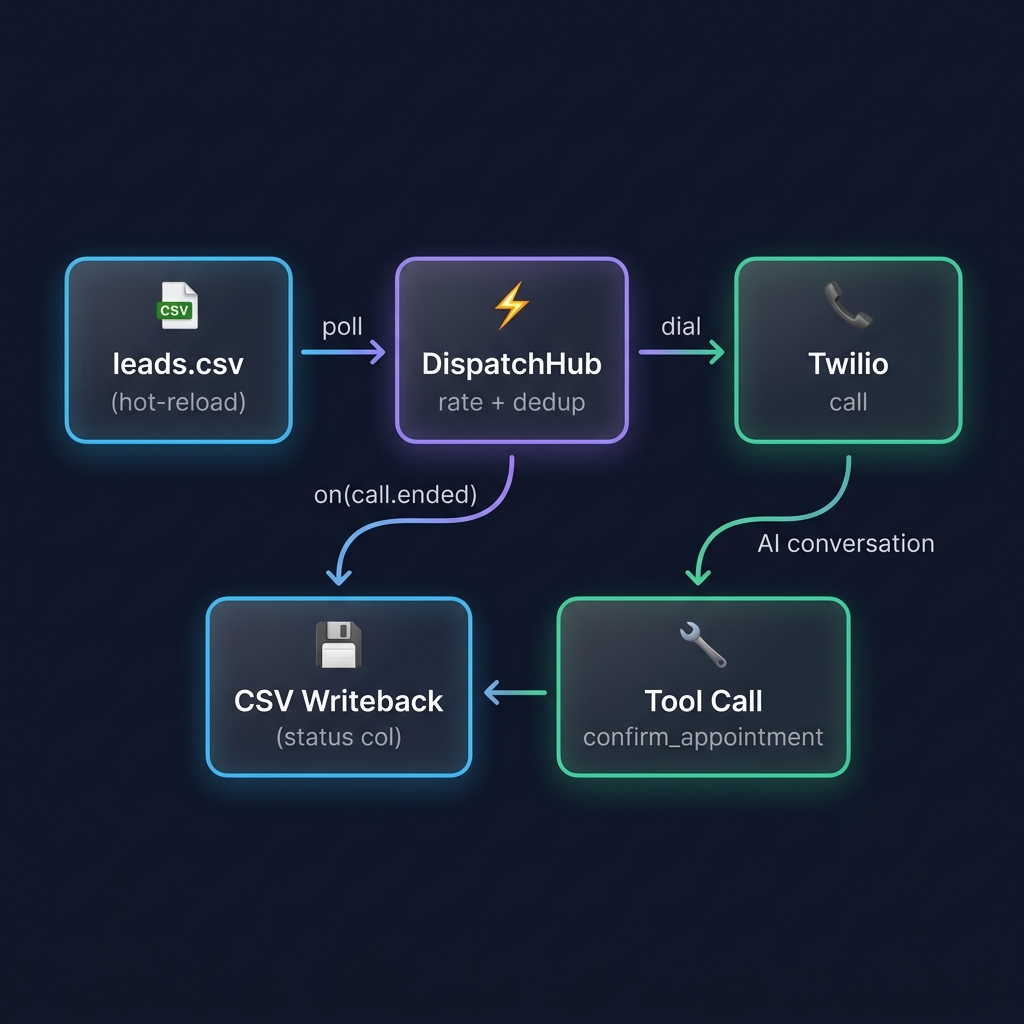
Prerequisites#
- A Pinecall API key with outbound calling enabled
- A phone number (Twilio) registered in your Pinecall organization
- Node.js ≥ 18
Setup#
cd examples/outbound-dispatch
cp .env.example .env
# Edit .env with your API key and phone
npm install
CSV format#
The CSV must have a header row. The dispatcher skips rows that already have a status value:
name,phone,service,date,time
Maria,+14155551234,Eye Exam,June 12,10:00 AM
Carlos,+14155559876,Physiotherapy,June 15,5:30 PM
After calls complete, the CSV is updated:
name,phone,service,date,time,status
Maria,+14155551234,Eye Exam,June 12,10:00 AM,confirmed
Carlos,+14155559876,Physiotherapy,June 15,5:30 PM,no_answer
Key concepts#
Content-based dedup#
Records are identified by phone + service + date, not by row index. Two identical CSV entries produce the same ID and are dispatched only once:
mapRow: (row) => ({
  id: `${row.phone}-${row.service}-${row.date}`,
  // ...
})
Phone-level dedup#
The hub tracks active phones. If Bernardo has two appointments (Eye Exam + Physio), only one call runs at a time. The second dispatches automatically after the first ends.
Prompt variables#
Each call sends per-call context via promptVars on the record returned by mapRow:
promptVars: {
  appointment_details: `Name: ${row.name}\nService: ${row.service}\nDate: ${row.date}\nTime: ${row.time}`,
},
These replace {{appointment_details}} in the agent prompt.
Lifecycle callbacks#
Handle calls that end without the AI calling a tool (rejected, no answer):
csv.onCompleted = (record, callId, reason) => {
  // Don't overwrite if the tool already wrote a status
  writeResultToCsv(record.phone, record.service, reason);
};

csv.onFailed = (record, error) => {
  writeResultToCsv(record.phone, record.service, "no_answer");
};
Dial rejection#
agent.dial() rejects immediately when Twilio reports busy, no-answer, failed, or canceled — no 30-second timeout. The hub catches this in onFailed.
Run#
node server.jsAdd rows to data/leads.csv while the script is running — the dispatcher detects new rows on every poll cycle (default 5s) and places calls automatically.