

Server-side LLM required. WhatsApp channels use the same
llmconfig as voice channels. Client-side LLM (bring-your-own) is not supported for WhatsApp.
Setup#
1. Create a Meta Business App#
Go to developers.facebook.com and create a Business app.
2. Add the WhatsApp product#
In your app dashboard, add WhatsApp from the product catalog.
3. Collect your credentials#
From the WhatsApp → API Setup page, grab:
- Phone Number ID — numeric string (e.g.
123456789012345) - Permanent Access Token — generate a system user token with
whatsapp_business_messagingpermission - App Secret — from App Settings → Basic (used for webhook signature verification)
4. Configure the webhook in your Meta app#
Webhook URL:
https://voice.pinecall.io/whatsapp/webhookVerification token: must match the verifyToken you pass to the SDK (default: pinecall-wa-verify).
Subscribe to the messages field.
Minimal WhatsApp agent#
import { Pinecall } from "@pinecall/sdk";

const pc = new Pinecall({ apiKey: process.env.PINECALL_API_KEY! });

const support = pc.agent("support", {
  language: "en",
  llm: "openai/gpt-5.4-nano",
  prompt: "You are a helpful support agent on WhatsApp. Be concise.",
});

support.addWhatsapp({
  phoneNumberId: "123456789012345",
  accessToken: process.env.WA_TOKEN!,
  verifyToken: "my-verify-token",
  appSecret: process.env.WA_APP_SECRET!,
});

support.on("whatsapp.message", (event) => {
  console.log(`📩 ${event.name}: ${event.text}`);
});
That's it. The first message a new contact sends fires whatsapp.sessionStarted, the LLM generates a response, and the SDK sends it back via the Cloud API.
WhatsAppChannelConfig#
| Field | Type | Required | Description |
|---|---|---|---|
phoneNumberId | string | ✅ | Meta Phone Number ID from API Setup |
accessToken | string | ✅ | Permanent Graph API access token |
verifyToken | string | — | Webhook verification token (default: pinecall-wa-verify) |
appSecret | string | — | App secret for HMAC signature verification (strongly recommended) |
Adding tools#
Tools work identically on WhatsApp and voice channels. Define them with tool() — the SDK handles execution on all channels:
import { tool } from "@pinecall/sdk";
import { z } from "zod";

const lookupOrder = tool({
  name: "lookupOrder",
  description: "Look up an order by ID",
  schema: z.object({ orderId: z.string() }),
  execute: async ({ orderId }) => await db.orders.findOne(orderId),
});

const support = pc.agent("support", {
  llm: "openai/gpt-5.4-nano",
  prompt: "...",
  tools: [lookupOrder],
});
Multi-channel: voice + WhatsApp on the same agent#
The same agent can serve WhatsApp and phone calls. The LLM config, tools, and prompt are shared — only the transport differs.
const support = pc.agent("support", {
  voice: "elevenlabs/sarah",
  language: "en",
  llm: "openai/gpt-5.4-nano",
  prompt: "...",
  tools: [lookupOrder],
});

support.addWhatsapp({ phoneNumberId: "123", accessToken: "EAA..." });
support.addPhoneNumber("+13186330963");

// Voice greeting (WhatsApp doesn't use this)
support.on("call.started", (call) => {
  if (call.transport === "phone" || call.transport === "webrtc") {
    call.say("Hello!");
  }
});
// Tools auto-execute on all channels — no extra handler needed.
Voice notes#
When a user sends a voice note on WhatsApp, the server automatically:
- Downloads the audio (OGG/Opus) from the Cloud API
- Transcribes it using Deepgram Nova-3
- Feeds the transcript to the LLM as if it were a text message
The agent sees voice notes as regular text. No extra code.
Requires
DEEPGRAM_API_KEYset on the voice server.
The 24-hour service window#
Meta enforces a 24-hour service window for free-form messaging:
- Inside the window: the agent can send any text. The window refreshes on every inbound message.
- Outside the window: only pre-approved template messages can be sent.
The SDK tracks the window automatically. If you try to send when it's closed, the server logs a warning. Template message support is on the roadmap.
Human takeover (pause/resume)#
Sometimes a human needs to step in. agent.pause() stops the AI from responding while keeping messages flowing to the SDK. The human sends replies via agent.sendMessage(), and when done, agent.resume() hands control back to the AI — with full conversation context preserved.
// A dashboard UI triggers this when a human wants to take over
support.on("whatsapp.message", (event) => {
  if (event.paused) {
    // AI is paused — show this message to the human operator
    dashboard.showMessage(event);
    return;
  }
  // Normal flow — AI handles automatically
});

// Pause a specific WhatsApp session
support.pause("wa-abc123");

// Human sends a message through WhatsApp
support.sendMessage({
  sessionId: "wa-abc123",
  text: "Hi! A human agent here. Let me help you with that.",
});

// Resume AI when the human is done
support.resume("wa-abc123");
Granularity options:
| Method | What it pauses |
|---|---|
agent.pause("wa-abc123") | One specific session |
agent.pause({ contact: "+34612..." }) | All sessions with this contact |
agent.pause() | Entire agent (all sessions) |
While paused:
- Messages are still forwarded to the SDK (with
paused: true) - Voice notes are still transcribed
- Human messages are added to LLM history (context preserved on resume)
- No typing indicator is shown (unless the human sends a message)
See the full Human Takeover guide for advanced patterns.
Environment variables#
Set these on the voice server (sdk-server):
| Variable | Required | Description |
|---|---|---|
WHATSAPP_VERIFY_TOKEN | — | Hub verification token (default: pinecall-wa-verify) |
WHATSAPP_APP_SECRET | — | Meta App Secret for webhook HMAC verification |
DEEPGRAM_API_KEY | For voice notes | Required if you want voice note transcription |
Session lifecycle#
WhatsApp conversations are grouped into sessions. Understanding the session lifecycle is key for history, human takeover, and any dashboard UI.
How sessions are identified#
Each session is uniquely identified by the agent + contact phone number pair. When a contact sends their first message, a new session is created with an ID like wa-a3f2b1c4d5e6. All subsequent messages from the same contact (to the same agent) belong to that session — until it ends.
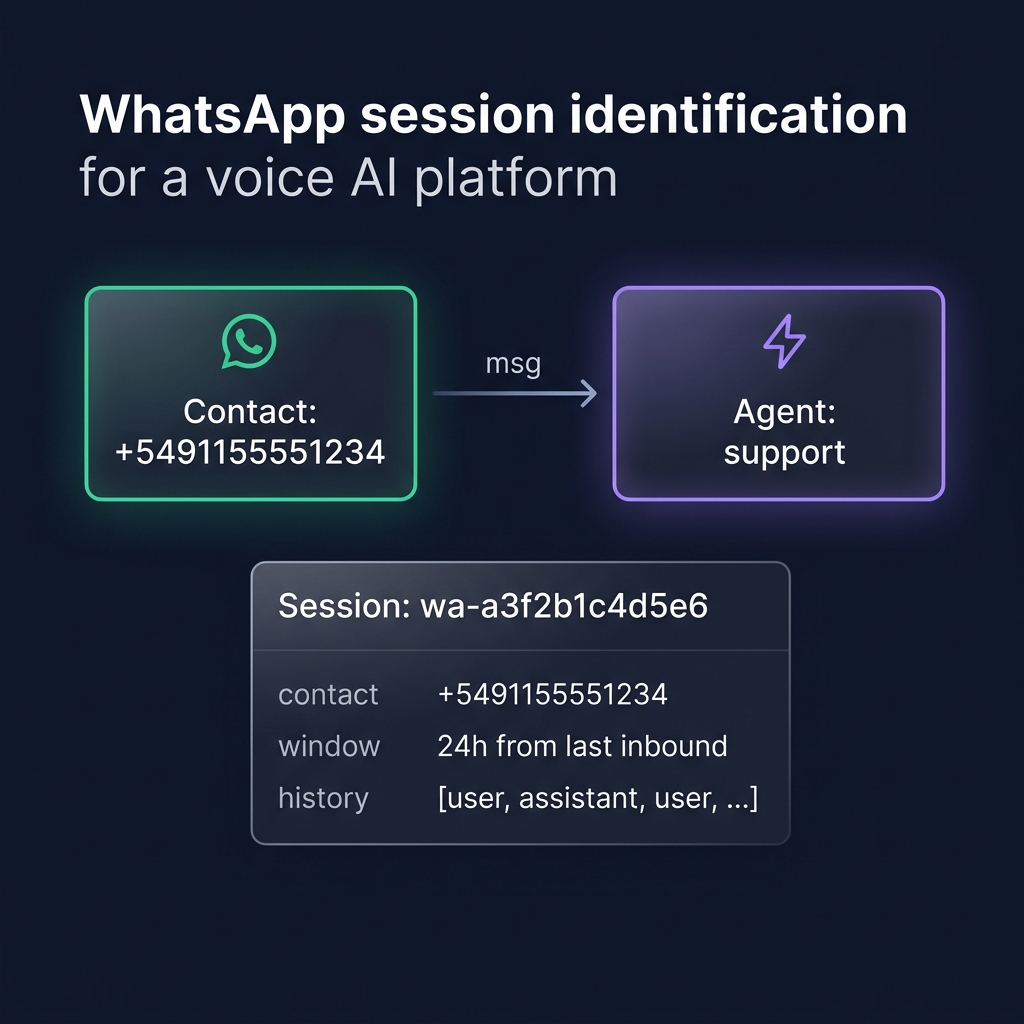
If a second contact writes to the same agent, they get a separate session with their own LLM history, window timer, and session ID.
Message flow#
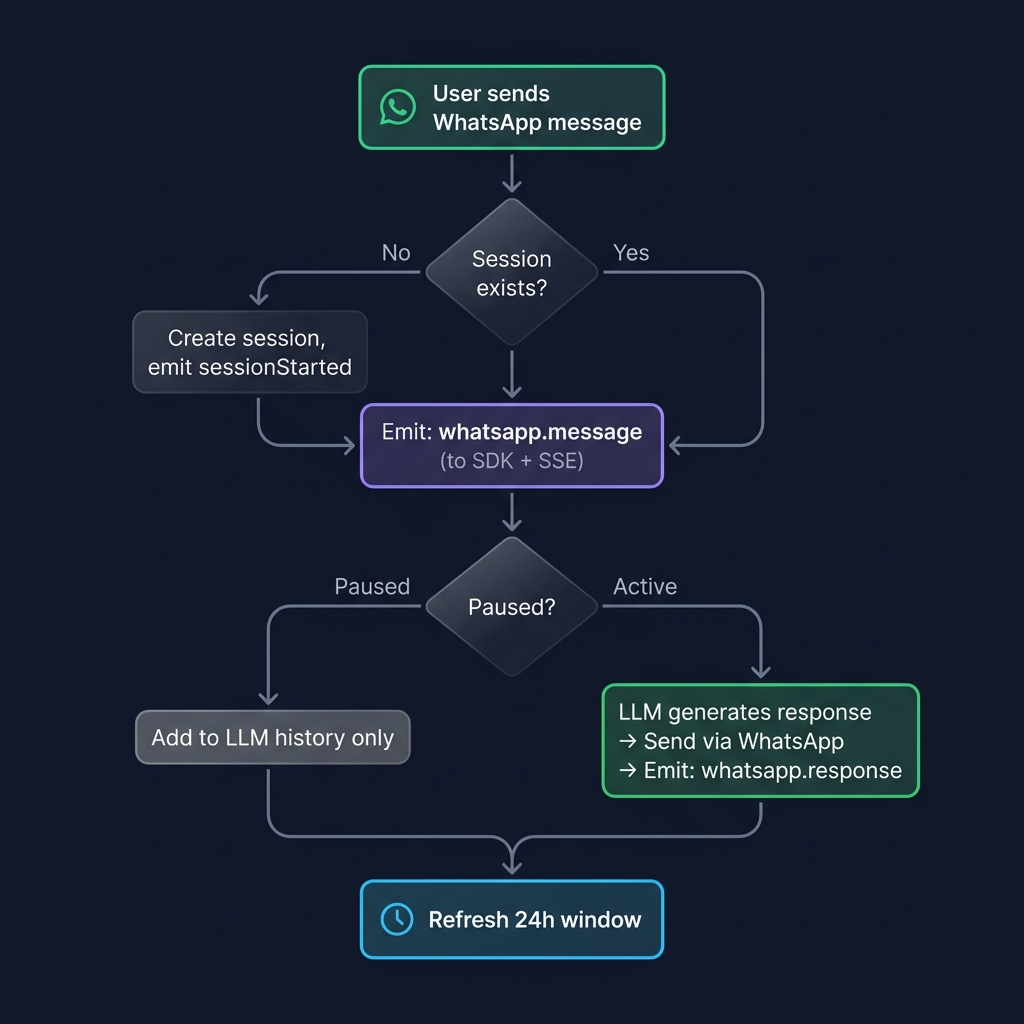
Key points:
- Every incoming message is emitted to the SDK via
whatsapp.message— even when paused - The
pausedfield in the event tells your UI whether the AI responded or not - Voice notes are automatically transcribed (Deepgram Nova-3) and treated as text
- Interactive replies (buttons, lists) are treated as text with the selected option
How sessions end#
Sessions end for one of two reasons:
| Reason | Trigger | What happens |
|---|---|---|
window_expired | 24h since the last inbound message | Meta's service window closes |
idle_timeout | No messages for the configured idle period | Contact stopped writing |
When a session ends:
whatsapp.sessionEndedis emitted with the full transcript and metadata- If a
HistoryStoreis configured, the conversation is automatically saved - The session is removed from memory
If the same contact writes again after a session ended, a new session is created (new ID, fresh LLM history — unless you restore history).
Session events timeline#
Session created (first message arrives)
  ├── whatsapp.sessionStarted  { sessionId, contactPhone, contactName }
  │
  ├── whatsapp.message          { sessionId, text, paused: false }
  ├── whatsapp.response         { sessionId, text }
  ├── whatsapp.status           { status: "sent" }
  ├── whatsapp.status           { status: "delivered" }
  ├── whatsapp.status           { status: "read" }
  │
  ├── whatsapp.message          { sessionId, text, paused: false }
  ├── whatsapp.response         { sessionId, text }
  │   ...
  │
  ├── (pause) ─────────────────────────────────────────
  │   ├── session.paused        { sessionId }
  │   ├── whatsapp.message      { sessionId, text, paused: true }   ← no AI response
  │   ├── whatsapp.response     { sessionId, text, source: "human" } ← human operator
  │   └── session.resumed       { sessionId }
  │
  └── whatsapp.sessionEnded    { sessionId, transcript, messages, duration }
                                      │
                                      ▼
                              HistoryStore.save() (automatic)
Conversation history#
When a HistoryStore is configured, WhatsApp conversations are automatically saved on whatsapp.sessionEnded — the same way voice calls are saved on call.ended.
import { Pinecall, JsonFileHistory } from "@pinecall/sdk";

const pc = new Pinecall({ apiKey: process.env.PINECALL_API_KEY! });

const history = new JsonFileHistory("./data/conversations.json");

const support = pc.agent("support", {
  llm: "openai/gpt-5.4-nano",
  prompt: "You are a support agent.",
  history,
});
What gets saved#
Each saved ConversationRecord includes:
| Field | Value | Example |
|---|---|---|
callId | The session ID | "wa-a3f2b1c4d5e6" |
agentId | Agent name | "support" |
channel | Always "whatsapp" | "whatsapp" |
from | Contact's phone number | "5491155551234" |
transcript | Clean user/assistant pairs | [{role: "user", content: "Hi"}, ...] |
messages | Full LLM history (with system, tools) | Raw message array |
duration | Session duration in seconds | 342 |
metadata.contactName | WhatsApp profile name | "John" |
metadata.messageCount | Total messages exchanged | 8 |
Querying history#
// Find all conversations with a specific contact
const conversations = await history.findByContact("5491155551234");

// List recent conversations for the agent
const recent = await history.list("support", 20);

// Get a specific conversation
const convo = await history.get("wa-a3f2b1c4d5e6");
findByContact searches the from field — which for WhatsApp is the contact's phone number (without +).
Note:
JsonFileHistoryis for prototyping. For production, implementHistoryStorewith your database (MongoDB, Postgres, etc).
Restoring prior conversations#
When your HistoryStore implements findByContact(), prior conversations are automatically restored when a returning contact starts a new session. No code needed — just set history in the agent config and the SDK handles everything.
If you need custom restore logic, the whatsapp.sessionStarted event passes a WhatsAppSession object with history methods:
agent.on("whatsapp.sessionStarted", async (session) => {
  // Custom: only restore if prior conversation had >5 messages
  const prior = await history.findByContact(session.contactPhone, 1);
  if (prior.length > 0 && prior[0].messages.length > 5) {
    await session.setHistory(prior[0].messages);
  }
});
WhatsAppSession provides the same history/prompt methods as Call:
| Method | Description |
|---|---|
session.setHistory(messages) | Replace server-side LLM history |
session.addHistory(messages) | Append messages to history |
session.getHistory() | Read current LLM history from server |
session.clearHistory() | Clear all LLM history |
session.setPrompt(text) | Replace the system prompt |
session.setPromptVars(vars) | Set {{variable}} values in prompt template |
session.addContext(text) | Append context after the system prompt |
The session object also exposes session.id, session.contactPhone, session.contactName, and session.agentId.
All WhatsApp events#
| Event | Data fields | When |
|---|---|---|
whatsapp.sessionStarted | WhatsAppSession object with id, contactPhone, contactName, setHistory(), etc. | First message from a new contact |
whatsapp.message | sessionId, from, name, type, text, messageId, paused | Incoming message received |
whatsapp.response | sessionId, to, text, source? | Agent or human sent a response |
whatsapp.status | status, recipient, messageId | Delivery status update |
whatsapp.sessionEnded | sessionId, contactPhone, transcript, messages, duration | Session expired or timed out |
session.paused | sessionId | AI paused for a session |
session.resumed | sessionId | AI resumed for a session |
Status values: sent → delivered → read.
The source field on whatsapp.response is "human" when the message was sent by a human operator via sendMessage(). Otherwise it's absent (AI-generated).
What's next#
- Conversation History — persistence options and custom stores
- Human Takeover — advanced pause/resume patterns
- Tools and Functions — let your WhatsApp bot take actions
- Dev mode — route specific WhatsApp senders to dev agents