

Quick reference: For just the type signatures and payload shapes, see Events Reference.
How events work#
Events flow from the voice server to your SDK agent over WebSocket. The server emits raw wire events (snake_case), and the SDK normalizes them to camelCase before invoking your handlers.
Voice Server → WebSocket → SDK Dispatcher → agent.on("event", handler)All handlers receive event-specific data as the first argument and the Call object as the last:
agent.on("event.name", (event, call) => {
  // event — payload (varies per event)
  // call  — the Call object for this session
});
Event catalog#
At a glance#
| Category | Events | Transport |
|---|---|---|
| Lifecycle | call.started, call.ended, call.preparing, call.ringing, call.forwarded, call.recording | All |
| Transport start | chat.started, whatsapp.started | Chat, WA |
| User speech | speech.started, speech.ended, user.speaking, user.message | Voice, WebRTC |
| Turn detection | eager.turn, turn.end, turn.continued | Voice, WebRTC |
| Bot speech | bot.speaking, bot.word, bot.finished, bot.interrupted | Voice, WebRTC |
| Bot preview | bot.word + call.currentBotText | Voice, WebRTC |
| Messages | message.confirmed, message.aborted, reply.rejected | Voice, WebRTC |
| Tools | llm.toolCall | All |
| Session | session.idleWarning, session.timeout, session.paused, session.resumed | Voice, WebRTC |
| Hold & mute | call.held, call.unheld, call.muted, call.unmuted | Voice, WebRTC |
| DTMF | call.dtmf_sent | Voice |
whatsapp.message, whatsapp.response, whatsapp.status, whatsapp.sessionEnded | ||
| Billing | credits.rejected, credits.exhausted | All |
| Audio | audio.metrics | Voice, WebRTC |
Lifecycle events, in brief:
call.started— a voice call connected (phone or WebRTC). (Chat →chat.started, WhatsApp →whatsapp.started.)call.preparing— fires before every LLM generation (voice, chat, and WhatsApp). Use it to refresh per-turn prompt variables that must be current on every turn — fresh date/time, format rules — viacall.setPromptVars(). The server waits ~150ms for your handler before it builds the prompt and calls the LLM, so variables are always just-in-time fresh (even in long-lived WhatsApp sessions).call.ended— the call finished; theCallis fully populated (duration,endedAt,messages,transcript).call.ringing— an inbound call is ringing; callaccept()orreject()before it connects.call.forwarded— the call was transferred to another number/agent.call.recording— recording state changed.
Lifecycle#
call.started#
A new voice call connected (phone or WebRTC).
agent.on("call.started", (call) => {
  console.log(`📞 ${call.direction} call from ${call.from}`);
  call.setPromptVars({ customer_name: "John" });
});| Field | Type | Description |
|---|---|---|
call.id | string | Unique call ID |
call.from | string | Caller number or "webrtc" |
call.to | string | Agent phone or agent ID |
call.direction | "inbound" | "outbound" | Call direction |
call.transport | "phone" | "webrtc" | Transport type |
call.metadata | object | Optional metadata from dial or alarm |
Note:
call.startedfires only for voice transports. For chat →chat.started. For WhatsApp →whatsapp.started.
call.preparing#
Fires before every LLM generation — voice, chat, and WhatsApp. Use it to refresh prompt variables that need to be current on every turn (dates, format rules, etc.).
agent.on("call.preparing", (call) => {
  call.setPromptVars({
    date_block: buildFreshDate(),
    format_rules: call.transport === "phone" ? VOICE_FORMAT : CHAT_FORMAT,
  });
});
The server waits briefly (~150ms) for your handler to finish before proceeding with the LLM call.
call.ended#
The call ended. The Call is now fully populated with duration, endedAt, messages, and transcript.
agent.on("call.ended", (call, reason) => {
  console.log(`Call ended: ${reason}, lasted ${call.duration}s`);
  console.log(`Transcript:`, call.transcript);
});| Field | Type | Description |
|---|---|---|
reason | string | Why it ended |
call.duration | number | Duration in seconds |
call.endedAt | number | Unix timestamp |
call.messages | array | Full LLM message history |
call.transcript | array | [{ role, content }] pairs |
Reason values: hangup, timeout, idle_timeout, max_duration, no_answer, busy, failed, client_hangup, chat_completed, chat_error.
call.ringing#
An inbound call is ringing — the caller hasn't been answered yet. Use with call.screen() to decide whether to accept or reject.
agent.on("call.ringing", (ringingCall) => {
  if (isBlacklisted(ringingCall.from)) {
    ringingCall.reject();
  } else {
    ringingCall.accept();
  }
});
See Call Screening guide for details.
call.forwarded#
The call was forwarded to another number via call.forward().
agent.on("call.forwarded", (event, call) => {
  console.log(`Call forwarded to ${event.to}`);
});call.recording#
A recording is available after the call ended. Contains the complete audio as base64-encoded WAV.
agent.on("call.recording", (event, call) => {
  // event.audio — base64 WAV data
  // event.duration_ms — recording duration
  // event.format — "wav"
  // event.sample_rate — typically 8000
  fs.writeFileSync(`recording-${call.id}.wav`, Buffer.from(event.audio, "base64"));
});
Only emitted when recording is enabled in the session config (
analysis.recording: true).
Transport-specific start events#
chat.started#
A new chat session started (text-only, no voice).
agent.on("chat.started", (call) => {
  // call.transport === "chat"
  call.setPromptVars({ format: "markdown" });
});whatsapp.started#
A new WhatsApp session started (first message from a contact).
agent.on("whatsapp.started", (call, session) => {
  // call — universal Call object
  // session — WhatsAppSession with contactPhone, contactName
  call.setPromptVars({ customer_name: session.contactName });
});
See WhatsApp guide for the full session lifecycle.
User speech#
speech.started#
VAD detected the user started speaking (audio energy crossed the speech threshold).
agent.on("speech.started", (event, call) => {
  // event.turn_id, event.confidence
});speech.ended#
VAD detected the user stopped speaking.
agent.on("speech.ended", (event, call) => {
  // event.turn_id, event.duration_ms
});user.speaking#
Interim STT transcript — fires multiple times as the STT engine refines its guess.
agent.on("user.speaking", (event, call) => {
  console.log(`Hearing: "${event.text}"`);
  // Updates rapidly: "hel" → "hello" → "hello how" → "hello how are you"
});user.message#
Final confirmed user text. After this fires, eager.turn or turn.end follows shortly.
agent.on("user.message", (event, call) => {
  console.log(`User said: "${event.text}"`);
  // event.messageId — use for reply correlation
});
Turn detection#
Turn detection determines when the user finished their thought and the bot should respond. See Turn Detection concept for how modes work.
eager.turn#
Early signal that the user probably finished a turn. Use for low-latency responses — start the LLM, but be ready to abort if turn.continued fires.
agent.on("eager.turn", (turn, call) => {
  // turn.text — accumulated transcript
  // turn.probability — confidence (0–1)
  // turn.messageId — for in_reply_to validation
});turn.end#
Final turn signal — higher confidence than eager.turn. This is where most apps trigger the LLM.
agent.on("turn.end", (turn, call) => {
  call.reply(turn.text);
});turn.continued#
The user kept talking after a turn signal. Any active ReplyStream auto-aborts. Your handler doesn't need to do anything — just don't be surprised when the stream stops.
agent.on("turn.continued", (event, call) => {
  console.log("User continued — aborting previous response");
});
Bot speech#
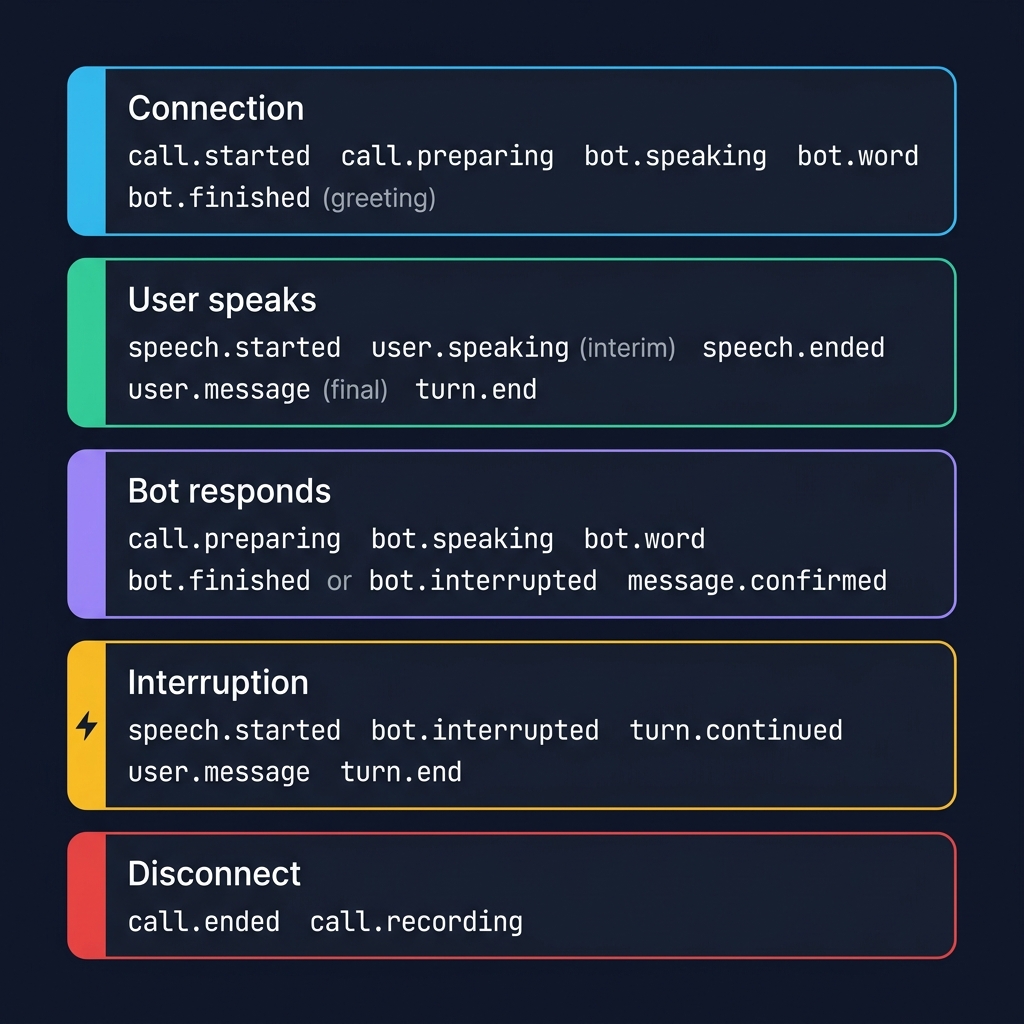
Bot speech follows this lifecycle:
bot.speaking  →  bot.word × N  →  bot.finished      (completed normally)
                                   bot.interrupted    (user barged in)
message.confirmed (full text saved)bot.speaking#
The bot started speaking a message.
agent.on("bot.speaking", (event, call) => {
  // event.messageId — tracks this specific utterance
  // event.text — full text for non-streaming replies (empty for replyStream)
});
For call.say() and call.reply(), event.text contains the full response. For call.replyStream(), text is empty — use bot.word events instead.
bot.word#
A single word was just played by TTS — synchronized with audio playback. Use for live captions, subtitles, or transcript UIs.
agent.on("bot.word", (event, call) => {
  // event.messageId — which message this word belongs to
  // event.word — the word just spoken
});
Timing: Words arrive spread across the audio duration, not all at once. A 5-second sentence = words arriving over 5 seconds.
bot.finished#
The bot finished speaking — TTS audio fully played.
agent.on("bot.finished", (event, call) => {
  // event.messageId
  // event.durationMs — how long the bot spoke
  console.log(`Done (${event.durationMs}ms): "${call.currentBotText}"`);
});
call.currentBotText is still available during this handler — it clears immediately after.
bot.interrupted#
The user cut off the bot mid-speech (barge-in).
agent.on("bot.interrupted", (event, call) => {
  // event.messageId
  // event.playedMs — how long the bot spoke before interruption
  // event.reason — "user_spoke" (after 2s) or "early" (before 2s)
  console.log(`Interrupted after ${event.playedMs}ms, said: "${call.currentBotText}"`);
});
Bot preview pattern#
The bot preview pattern combines bot.word events with call.currentBotText to show a live, word-by-word preview of what the bot is saying — like real-time subtitles.
call.currentBotText accumulates each bot.word automatically:
- Resets on each new
bot.speaking - Available during
bot.finishedandbot.interruptedhandlers - Clears immediately after those handlers return
// Live subtitles — grows word-by-word as the bot speaks
agent.on("bot.word", (event, call) => {
  updateSubtitle(call.currentBotText);
  // "¡Hola!"
  // "¡Hola! Estoy"
  // "¡Hola! Estoy bien,"
  // "¡Hola! Estoy bien, gracias."
});

// Capture full text when bot finishes
agent.on("bot.finished", (event, call) => {
  saveToTranscript("bot", call.currentBotText);
});

// Capture partial text when user interrupts
agent.on("bot.interrupted", (event, call) => {
  saveToTranscript("bot (interrupted)", call.currentBotText);
});
Message lifecycle#
message.confirmed#
The server acknowledged a bot message you sent (via say, reply, or replyStream). The message text is now saved to LLM history.
agent.on("message.confirmed", (event, call) => {
  // event.messageId
  // event.text — the confirmed message text
});message.aborted#
A bot message was aborted before it could be confirmed — typically because the user barged in or a new turn started.
agent.on("message.aborted", (event, call) => {
  // event.messageId
  // event.reason
});reply.rejected#
A bot reply was rejected because the in_reply_to message ID no longer matches the current user message. This happens when the user continued speaking after the bot started preparing a response.
agent.on("reply.rejected", (event, call) => {
  // event.messageId — the rejected bot message
  // event.in_reply_to — what the reply referenced
  // event.expected_reply_to — what the server expected
  // event.reason — "message_obsolete" etc.
});
This is a protocol-level event. You typically don't need to handle it — the SDK manages reply validation automatically.
Tools#
llm.toolCall#
The server-side LLM is requesting one or more tool calls. If you registered tools with tool(), the SDK auto-executes them and sends results back. This event still fires — use it for logging, metrics, or UI updates.
agent.on("llm.toolCall", (data, call) => {
  for (const tc of data.toolCalls) {
    console.log(`🔧 ${tc.name}(${tc.arguments})`);
  }
  // data.msgId — correlation ID
  // data.toolCalls — [{ id, name, arguments }]
});
See Tools and Functions guide for how to define tools.
Session#
session.idleWarning#
Fires before idle timeout — the user hasn't spoken in a while. Use it to prompt them.
agent.on("session.idleWarning", (event, call) => {
  // event.remainingSeconds — time left before timeout
  // event.idleTimeoutSeconds — total idle timeout configured
  call.say("Are you still there?");
});session.timeout#
A session limit was hit. The call is about to end.
agent.on("session.timeout", (event, call) => {
  // event.reason — "max_duration" | "idle_timeout"
  call.say("We've reached the time limit. Goodbye!");
});session.paused#
Confirmation that the agent was paused (human-in-the-loop). Fires after agent.pause().
agent.on("session.paused", (event) => {
  // event.sessionId — set for session-level pause
  // event.contact — set for contact-level pause
  // both undefined = global pause
});session.resumed#
Confirmation that the agent was resumed. Fires after agent.resume().
agent.on("session.resumed", (event) => {
  // event.sessionId
  // event.contact
});
Hold & mute#
These events fire when you use the call.hold() / call.unhold() / call.mute() / call.unmute() methods.
call.held#
The call was placed on hold. Hold music starts playing.
agent.on("call.held", (event, call) => {
  console.log("📞 Call on hold");
});call.unheld#
The call was taken off hold. Normal conversation resumes.
agent.on("call.unheld", (event, call) => {
  console.log("📞 Call resumed");
});call.muted#
The mic was muted. Transcripts are buffered while muted.
agent.on("call.muted", (event, call) => {
  console.log("🔇 Mic muted");
});call.unmuted#
The mic was unmuted. Any speech captured while muted is available as buffered text.
agent.on("call.unmuted", (event, call) => {
  if (event.muted_transcript) {
    console.log(`While muted, user said: "${event.muted_transcript}"`);
  }
});DTMF#
call.dtmf_sent#
DTMF tones were sent on the call (via call.sendDTMF()).
agent.on("call.dtmf_sent", (event, call) => {
  // event.digits — the digits sent
});WhatsApp#
whatsapp.message#
Incoming WhatsApp message from the user.
agent.on("whatsapp.message", (event) => {
  // event.sessionId
  // event.from — contact phone number
  // event.name — contact name
  // event.type — "text" | "audio" | "image" | "video" | "document"
  // event.text — message text (for audio, this is the transcript)
  // event.messageId
  // event.paused — true when agent is paused (human-in-the-loop)
});
When paused is true, the AI did not respond — a human should handle this message via agent.sendMessage().
whatsapp.response#
The agent sent a WhatsApp response.
agent.on("whatsapp.response", (event) => {
  // event.sessionId
  // event.to — recipient phone
  // event.text — message text
  // event.source — "human" when sent by operator via agent.sendMessage()
});whatsapp.status#
Delivery status update from Meta.
agent.on("whatsapp.status", (event) => {
  // event.status — "sent" | "delivered" | "read"
  // event.recipient
  // event.messageId
});whatsapp.sessionEnded#
A WhatsApp session ended (inactivity timeout or manual close).
agent.on("whatsapp.sessionEnded", (event) => {
  // event.session_id
  // event.contact_phone
  // event.duration
  // event.message_count
});Billing#
credits.rejected#
The call was rejected at connection time because the org has no credits remaining.
agent.on("credits.rejected", (event) => {
  console.log("⛔ No credits — call rejected");
});credits.exhausted#
Credits ran out during an active call. The server will end the call shortly.
agent.on("credits.exhausted", (event, call) => {
  call.say("We've run out of credits. The call will end shortly.");
});
Audio metrics#
When you enable analysis.send_audio_metrics:
agent.on("audio.metrics", (event, call) => {
  // event.source — "user" | "bot"
  // event.energyDb — -60 to 0
  // event.rms — 0–1
  // event.peak — 0–1
  // event.isSpeech — VAD detection
  // event.vadProb — 0–1
});
Use for live waveform UIs, energy meters, or VAD visualization. Fires every ~100ms.
Real-time flow#
Here's the complete sequence of events during a typical voice exchange:
SSE events#
When streamed over SSE (via pc.stream() or agent.stream()), each event has an event: field and a JSON data: body:
event: user.message
data: {"callId":"CA123","text":"Hello","messageId":"msg_abc","agent":"mara"}

event: bot.word
data: {"callId":"CA123","word":"Hi","messageId":"msg_def","agent":"mara"}
A :ping comment is sent every 30s as keepalive.
SSE streams include: call.started, bot.speaking, bot.word, message.confirmed, user.speaking, user.message, call.ended.
What's next#
- Events Reference — compact type signatures for all events
- Call API — methods to call in response to events
- Turn Detection — how turn modes affect event timing
- Tools and Functions — handling
llm.toolCall - WhatsApp — WhatsApp session lifecycle
- Live Listening —
audio.metricsfor visualization