

Code-first, not platform-first#
Traditional voice AI platforms ask you to adapt your app to them — configure agents in a dashboard, expose webhooks, maintain JSON tool schemas separately from your code, send data to their servers.
Pinecall flips this. The agent runs inside your process:
import { Pinecall, tool } from "@pinecall/sdk";
import { z } from "zod";
import { db } from "./db.js";

const pc = new Pinecall();

const lookupOrder = tool({
  name: "lookupOrder",
  description: "Look up a customer's order by their phone number.",
  schema: z.object({ phone: z.string() }),
  execute: async ({ phone }) => await db.orders.findOne({ phone }),
});

export const agent = pc.agent("support", {
  prompt: "You are a support agent for Acme Corp.",
  llm: "openai/gpt-5.4-nano",
  voice: "elevenlabs/sarah",
  stt: "deepgram/flux",
  phoneNumber: "+15551234567",
  greeting: "Hi, how can I help?",
  tools: [lookupOrder],
});
No webhooks. No separate tool server. No "upload your tools as JSON". Your tools are just functions with Zod schemas, auto-executed by the SDK.
Voice as a library, not a platform#
The SDK is a dependency — npm install @pinecall/sdk. It lives in your package.json alongside Express, Prisma, and everything else you already use.
You don't migrate to Pinecall. You add it to your existing app. Your existing Express routes, your existing database connection, your existing auth — they all stay exactly where they are.
The server does the hard parts#
Your code handles business logic. The Pinecall voice server handles the things that are genuinely hard:
| Your code | Voice server |
|---|---|
| Prompts and personality | Audio transport (WebRTC, Twilio, SIP) |
| Tool functions | Speech-to-text (Deepgram, Gladia, AWS) |
| Business logic | Text-to-speech (ElevenLabs, Cartesia) |
| Database queries | Voice Activity Detection (VAD) |
| Conversation history | Turn detection |
| When to start/stop calls | Audio mixing and streaming |
The split is clean: you own the what (what the agent says, what tools it has, what data it accesses), the server owns the how (how audio is captured, transcribed, synthesized, and played back).
One connection, many agents#
A single WebSocket connection multiplexes everything:
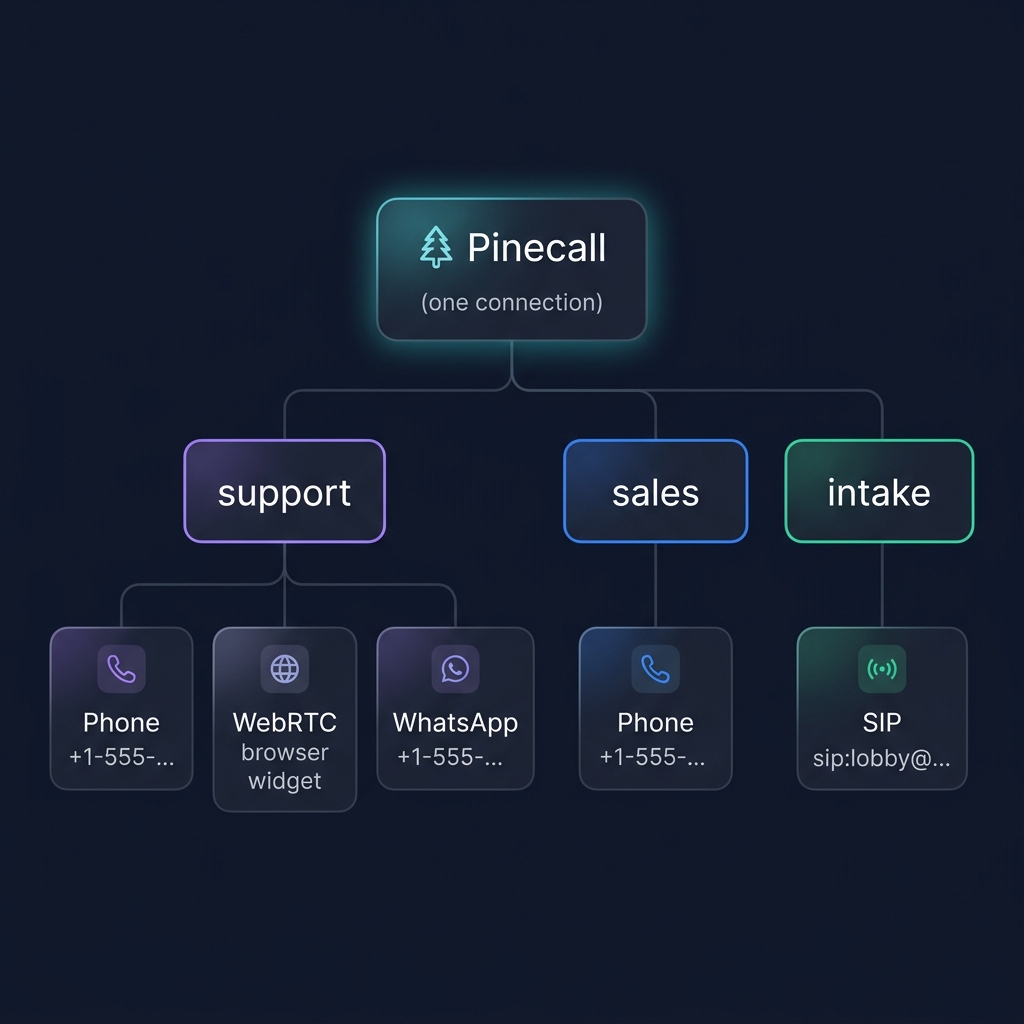
No separate infrastructure per agent. No load balancer per channel. One new Pinecall(), as many agents as you need.
Config is code#
There is no dashboard to configure. Agent config lives in your source code, version-controlled, reviewable:
const agent = pc.agent("mara", {
  prompt: fs.readFileSync("./prompts/mara.md", "utf-8"),
  llm: "openai/gpt-5.4-nano",
  voice: "elevenlabs/sarah",
  language: "es",
  stt: { provider: "deepgram-flux", keyterms: ["Acme", "checkout"] },
  phoneNumber: "+13186330963",
  sessionLimits: { idle_timeout_seconds: 30, idle_warning_seconds: 10 },
});
Change anything — prompt, voice, model, channels — and the server picks it up on the next connection. No redeployment of a separate config layer. See Hot Reload.
Your data never leaves your process#
When the LLM calls a tool, Pinecall routes that call to your SDK handler. Your handler runs in your process — it can query your database, call your internal APIs, read files from disk. The tool result goes back to the LLM through the same WebSocket.
No data is stored on Pinecall servers. No conversation history is persisted unless you persist it. No tool results are logged unless you log them.
What's next#
- Quickstart — see the philosophy in action
- Agents and Channels — the core abstraction
- Deployment Topologies — how to run in production