

Pinecall's dev mode solves both. One phone number, many agents in parallel, routed by the caller's phone number. Production handles all calls except yours; your calls go to your dev agent.
How it works#
Every agent has an ID — florencia, mara, support. In dev mode, you give your agent a unique slug — dev-berna-florencia, dev-juan-florencia — and tell Pinecall which phone numbers should route to that slug.
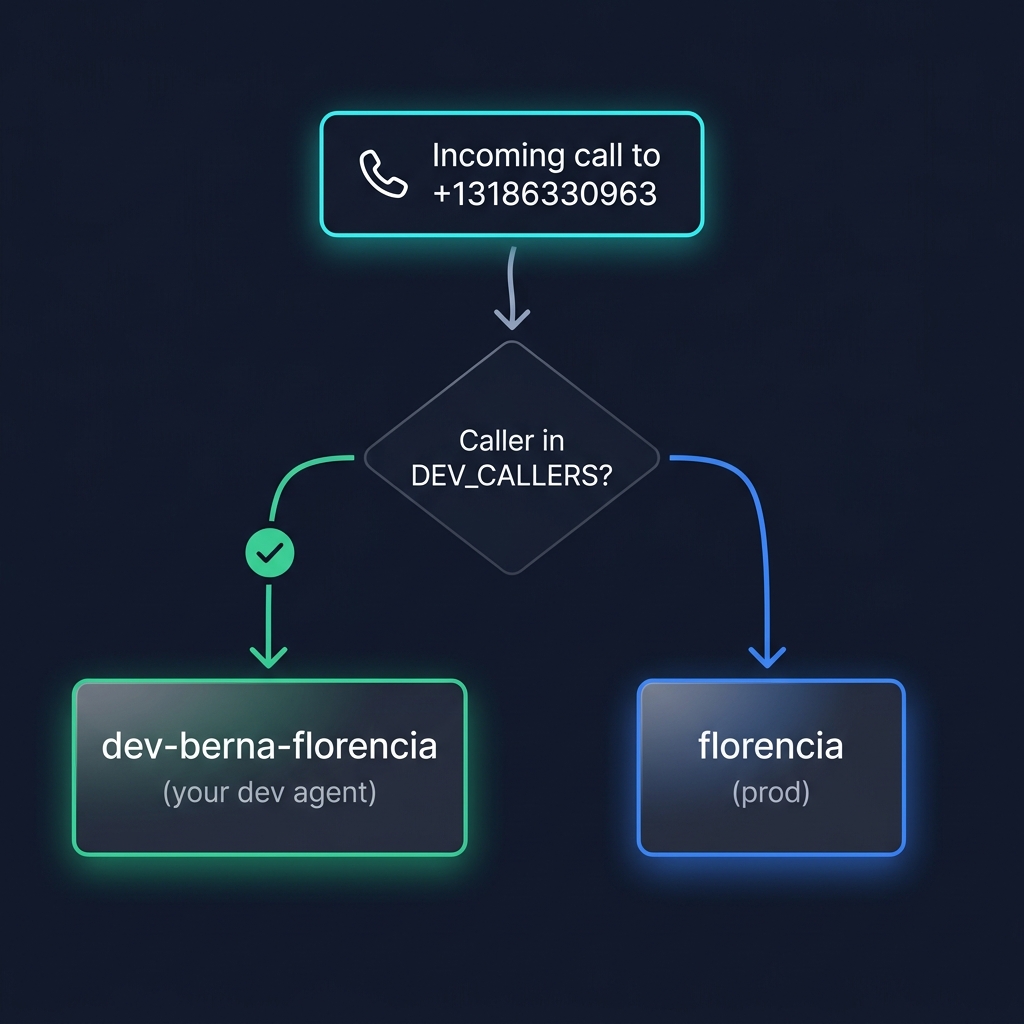
Zero extra cost. One number serves prod and every dev simultaneously.
Setup#
1. Make the agent ID environment-aware#
import { Pinecall } from "@pinecall/sdk";
import { userInfo } from "os";

const isDev = process.env.NODE_ENV === "development";
const agentId = isDev ? `dev-${userInfo().username}-florencia` : "florencia";

const pc = new Pinecall({ apiKey: process.env.PINECALL_API_KEY! });

const agent = pc.agent(agentId, {
  prompt: "...",
  llm: "openai/gpt-5.4-nano",
  voice: "elevenlabs/sarah",
  stt: "deepgram/flux",
  phoneNumber: "+13186330963", // shared with prod!
});
os.userInfo().username gives you berna on Berna's machine, juan on Juan's, etc. Each dev automatically gets a unique slug.
2. Tell Pinecall which callers to route to dev#
if (isDev) {
  const callers = process.env.DEV_CALLERS;
  if (callers) {
    agent.routeCallers(callers.split(",").map((s) => s.trim()));
  }
}
3. Each dev gets their own .env.local#
# .env.local — gitignored, each dev sets their own
DEV_CALLERS=+34600123456
Vite users: Vite loads
.env.localbut does not inject non-VITE_variables intoprocess.envfor server plugins. You must setNODE_ENVandDEV_CALLERSin the shell or your start command:NODE_ENV=development DEV_CALLERS=+34600123456 npx vite --port 5170Alternatively, if your agent boots inside a Vite plugin (
configureServer), load.env.localmanually withdotenv.
Now when Berna calls +13186330963 from her phone (+34600123456), the call routes to dev-berna-florencia. When anyone else calls, it goes to florencia (prod).
Multiple devs at once#
| Developer | Agent ID | Phone routing |
|---|---|---|
| Berna | dev-berna-florencia | Calls from +34607... → Berna's agent |
| Juan | dev-juan-florencia | Calls from +34612... → Juan's agent |
| Production | florencia | All other callers |
+13186330963 (shared Twilio number)
    │
    ├── Call from +34607... → dev-berna-florencia
    ├── Call from +34612... → dev-juan-florencia
    └── Call from anyone else → florencia (production)
WhatsApp dev routing#
WhatsApp uses the same sender-based routing. routeCallers() configures both phone and WhatsApp routing in one call:
if (isDev) {
  agent.routeCallers(["+34600123456"]); // routes BOTH phone calls AND WhatsApp messages
}
When Berna sends a WhatsApp message from +34600123456, it lands on dev-berna-florencia. When anyone else sends a message, it lands on prod.
WebRTC & chat dev routing#
WebRTC and chat don't use caller-based routing — there's no "caller number" in a browser. Instead they use slug-based isolation: each browser requests a token for a specific agent ID.
// Dev mode → agent registers as "dev-berna-florencia"
// On your server, mint a token for "dev-berna-florencia" specifically
const pc = new Pinecall(); // PINECALL_API_KEY from env
const token = await pc.createToken("webrtc", "dev-berna-florencia");
// or, with the Agent instance: agent.createToken("webrtc")
Each dev gets their own slug, their own tokens, their own sessions. Nothing crosses over.
Why this is better than per-dev phone numbers#
| Per-dev numbers | Pinecall dev mode | |
|---|---|---|
| Cost | $1/month/dev + minutes | $0 extra |
| Setup per dev | Buy number, configure routing, share creds | Set DEV_CALLERS=+... |
| Realism | Different number = different call origin behavior | Same number, real routing |
| Cleanup when dev leaves | Cancel number, update routing | Delete from .env.local |
| Prod isolation | Manual — easy to leak | Automatic — only your number reaches your agent |
What's next#
- Deployment topologies — headless agents are common for dev
- Multi-tenant — similar isolation pattern for SaaS
Agent.routeCallers— the API reference